Dynamic MCP Server for GraphQL APIs with Nife.io
Build a dynamic MCP server for GraphQL APIs with Nife.io. Enable Claude integration, auto schema discovery, and zero-config setup.

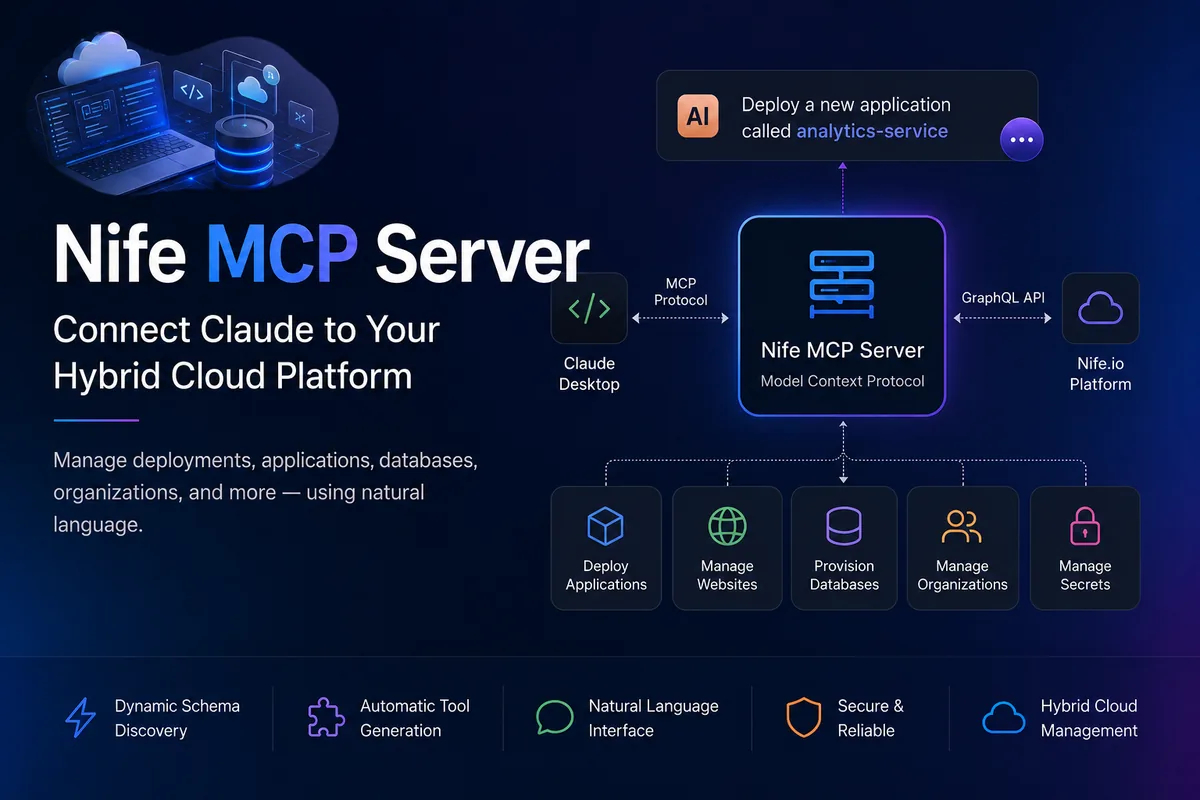
Build a Dynamic MCP Server for Hybrid Cloud with Nife.io
Modern infrastructure management involves handling multiple services, APIs, and dashboards across cloud environments. This often leads to operational complexity and reduced developer productivity.
The Nife MCP Server introduces a more intuitive approach by enabling natural language interaction with your infrastructure through AI.
Overview
The Nife MCP Server is an implementation of the Model Context Protocol (MCP) that connects AI assistants such as Claude Desktop to the Nife.io hybrid cloud platform.
It serves as an interface between:
- Natural language input from users
- AI processing via Claude
- Backend infrastructure powered by Nife.io GraphQL APIs
About Nife.io
Nife.io is a hybrid cloud platform designed to simplify how teams manage infrastructure across multiple cloud providers through a single, unified interface.
It enables users to:
- Connect and manage multiple cloud accounts in one place
- Provision and control infrastructure resources without provider-specific complexity
- Deploy and manage applications, websites, and databases
- Manage organizations, users, and access control centrally
Traditional cloud platforms often require navigating complex dashboards, service-specific configurations, and fragmented workflows. Nife.io abstracts this complexity by providing a simplified and consistent interface across providers.
This approach allows teams to:
- Reduce the learning curve associated with cloud platforms
- Operate faster with streamlined workflows
- Manage multi-cloud environments efficiently
- Focus more on building applications rather than managing infrastructure
Key Capabilities
The Nife MCP Server enables AI-driven interaction with your infrastructure by exposing platform operations as dynamically generated tools.
Through this, users can:
-
Deploy and manage applications
Create, update, and monitor application deployments across environments without manually interacting with cloud dashboards or APIs. -
Query infrastructure and resources
Retrieve real-time information about applications, websites, deployments, and underlying resources using natural language queries. -
Manage organizations and access control
Create organizations, manage teams, assign roles, and control access across projects from a centralized interface. -
Collaborate through user management
Invite users, onboard teams, and manage permissions efficiently within shared environments. -
Handle secrets and configurations securely
Create, update, and manage environment variables and sensitive configurations required for deployments. -
Execute dynamic GraphQL operations
Leverage automatic schema discovery to perform both predefined and custom queries or mutations without manual schema handling.
All interactions are translated in real time into GraphQL operations, allowing users to control and operate their infrastructure through natural language via Claude, eliminating the need for direct API calls or manual UI navigation.
Example Interactions
"List all my applications"
"Deploy a new application called analytics-service"
"Create a new organization for my team"
"Invite a user to the organization"
"Update production environment secrets"
Architecture
The system follows a simple and extensible architecture:
- Claude Desktop communicates with the MCP Server using the Model Context Protocol.
- The MCP Server translates user intent into GraphQL queries.
- The Nife.io platform executes these queries and returns results.
Core Components
The Nife MCP Server is built on a modular architecture that enables dynamic interaction between natural language inputs and GraphQL-based infrastructure operations.
Schema Manager
Responsible for GraphQL schema introspection and lifecycle management.
It continuously analyzes the Nife.io GraphQL API to:
- Discover available queries, mutations, and types
- Adapt automatically to schema changes without manual updates
- Provide structured metadata for downstream components
This ensures the MCP server remains aligned with the latest backend capabilities at all times.
Tool Generator
Transforms the discovered GraphQL schema into MCP-compatible tools dynamically.
- Maps queries and mutations into callable MCP tools
- Generates tool definitions at runtime based on schema structure
- Eliminates the need for hardcoded API integrations
This allows AI agents like Claude to access backend capabilities as native tools.
Query Builder
Acts as the translation layer between natural language and GraphQL.
- Interprets user intent from AI-generated context
- Constructs valid and optimized GraphQL queries and mutations
- Handles parameter mapping, validation, and formatting
This component ensures that user requests are accurately converted into executable backend operations.
Authentication Layer
Manages secure communication between the MCP server and Nife.io APIs.
- Uses bearer token-based authentication
- Injects credentials into outgoing requests
- Supports secure environment-based configuration
This guarantees that all operations are performed within the correct user context with proper access control.
Installation
Using NPX
npx @nifelabs/mcp-server@latest
Using Python
pip install nife-mcp-server
Configuration
Example configuration for Claude Desktop:
{
"mcpServers": {
"nife": {
"command": "npx",
"args": ["--yes", "@nifelabs/mcp-server@latest"],
"env": {
"NIFE_ACCESS_TOKEN": "your_token_here"
}
}
}
}
Usage
Once the Nife MCP Server is installed and configured, it can be started using the following command:
nife-mcp-server
When the server is running, it exposes MCP-compatible endpoints that can be consumed by AI clients such as Claude Desktop.
After configuring Claude to use the Nife MCP Server, users can begin interacting with their infrastructure using natural language.
Example Workflows
-
Retrieve infrastructure state
"List all my applications"
"Show all deployments in my organization" -
Perform deployment operations
"Deploy a new application called analytics-service"
"Update the configuration of my existing service" -
Manage teams and access
"Create a new organization"
"Invite a user to my workspace" -
Configure environments
"Add a new secret for production"
"Update environment variables for staging"
All user inputs are processed by Claude, translated into MCP tool calls, and executed as GraphQL operations on the Nife.io platform.
This enables a seamless workflow where infrastructure can be queried, managed, and modified without directly interacting with dashboards or writing API requests.
Benefits
- Reduces operational complexity
- Enables natural language infrastructure management
- Eliminates the need for manual API handling
- Improves developer productivity
- Supports dynamic adaptation to backend changes
Use Cases
- DevOps automation
- Platform engineering workflows
- Internal developer tools
- AI-assisted infrastructure management
Conclusion
The Nife MCP Server represents a shift toward AI-driven infrastructure management. By combining GraphQL, MCP, and natural language interfaces, it simplifies how developers interact with complex cloud environments.
This approach enables faster workflows, reduced friction, and a more intuitive developer experience.
Repository
https://github.com/nifetency/nife-mcp-graphql
Website
Platform
From the team at Nife
Deploy your next app in minutes, not days.
Nife is a multi-cloud edge platform that lets you deploy, scale, and manage applications globally without the infrastructure headache.