How Nife.io Manages Secrets Without Trusting the Network
A deep dive into Nife’s Customer Vault: AES-CBC encryption, multi-provider support, audit logs, auto-rotation, and real-world usage.

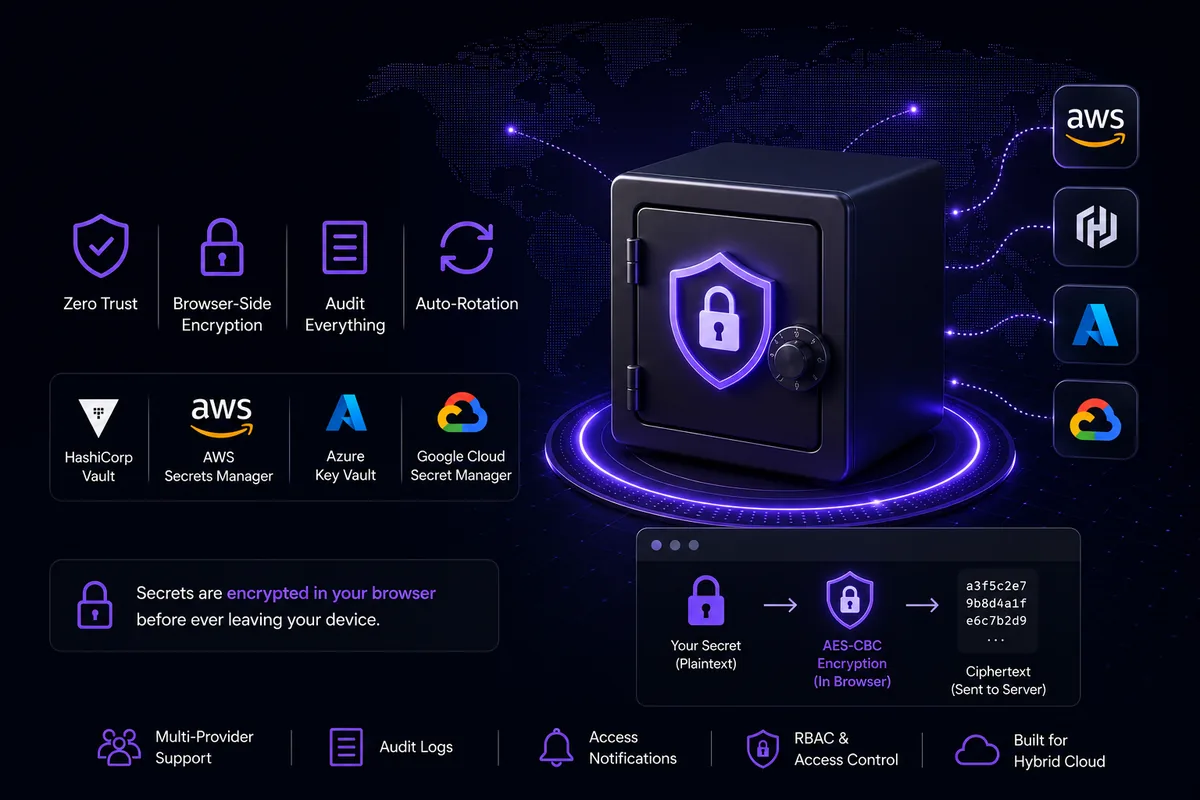
How Nife.io Manages Secrets Without Trusting the Network
Every production application has secrets — database passwords, API keys, third-party tokens, signing certificates. The question isn't whether you have them. It's whether your platform handles them in a way that doesn't make a breach catastrophic.
Nife's Customer Vault is built around one hard rule: the server never sees plaintext. This post walks through how that works, what the vault actually does, real-world use cases for each feature, step-by-step usage, and why the architecture choices matter for teams running workloads across hybrid and multi-cloud environments.
The Problem with Naive Secret Storage
Most teams start with environment variables hardcoded in CI pipelines or .env files committed to private repos. This works until it doesn't — a misconfigured repo visibility, a CI log that echoes env vars, a colleague whose laptop is compromised.
Even platforms that store secrets server-side often transmit the plaintext value over HTTPS, trusting TLS as the only layer of protection. If the backend is ever read, the secrets are readable too.
Here is what real secret mismanagement looks like across teams:
| Mistake | Consequence |
|---|---|
.env file pushed to a public repo | Full credential leak, instant compromise |
| Hardcoded secrets in Docker image layers | Extractable by anyone with image access |
| CI logs printing env vars | Secrets visible in build history |
| Shared spreadsheet of passwords | No audit trail, no rotation, no access control |
| One AWS IAM key used everywhere | Single point of failure across all environments |
Nife takes a different approach — encrypt before sending, audit everything, and never let plaintext touch the wire.
AES-CBC Encryption Before the Request Leaves the Browser
The core security property of the Nife Vault is that secret values are encrypted in the browser using AES-CBC before any network request is made. The encryption key is derived from VITE_AES_KEY (or VITE_ENCRYPTION_KEY) — an environment variable baked into the frontend build, never sent to the backend.
This mirrors the Go backend's AesDeCrypt function — both sides use the same key, the same IV (the key itself, first 16 bytes), CBC mode, and PKCS7 padding. The only difference is direction: the frontend decrypts what the backend stores; the backend stores what the frontend encrypts.
What this means in practice:
- The API endpoint receives a hex-encoded ciphertext blob, not a password
- The database stores ciphertext
- If the database is dumped, secrets are still protected by the AES key
- Vault provider credentials (URL, token, mount path) go through the same encryption pipeline before leaving the browser
Multi-Provider Architecture
Not every team wants to run secrets inside Nife's infrastructure. Regulated industries often need secrets to stay inside their own AWS account or behind their own HashiCorp Vault. The Nife Vault is designed around this — it's a control plane, not just a store.
Supported providers:
| Provider | Identifier | Best For |
|---|---|---|
| Nife Internal Vault | INTERNAL | Startups, quick setup, no existing vault infra |
| HashiCorp Vault | HASHICORP_VAULT | Enterprises with self-hosted Vault already running |
| AWS Secrets Manager | AWS_SECRETS_MANAGER | Teams already deep in the AWS ecosystem |
| Azure Key Vault | AZURE_KEY_VAULT | Microsoft-centric orgs and Azure workloads |
| GCP Secret Manager | GCP_SECRET_MANAGER | GCP-native teams and GKE deployments |
Each provider is registered with a providerConfig blob — a JSON object containing credentials and connection details — which is itself encrypted before being sent to the backend. For HashiCorp Vault, this looks like:
{
"url": "https://vault.company.com:8200",
"token": "hvs.xxxxxxxxxxxxxxxx",
"mount_path": "secret",
"auth_method": "token",
"tls_verify": true
}
This JSON is AES-encrypted using encryptForBackend() before the createVaultProvider GraphQL mutation fires.
How to Connect a Vault Provider
- Go to Governance → Secrets & Vault in your Nife dashboard
- Click Add Provider (top-right)
- Enter a Display Name like
Prod AWSorStaging HashiCorp - Select your Organization
- Pick a Provider Type from the dropdown
- Fill in the credentials for that provider (e.g. Vault URL + token for HashiCorp)
- Optionally check Set as default vault provider
- Click Add Provider
Tip: Use the Test Connection button on the provider card immediately after adding — it pings the provider and updates the health badge from
unknowntohealthyorunhealthyin real time.
Use Case — Keeping Secrets Inside Your Own AWS Account
A fintech company must not store customer-related credentials outside their AWS boundary due to compliance requirements. They:
- Connect their AWS Secrets Manager as a provider in Nife
- All secrets created in that org are routed to AWS — Nife stores only ciphertext references
- Rotation happens via AWS Secrets Manager's native engine
- Nife's audit log captures who accessed what and when, satisfying SOC 2 requirements
Provider Health and Sync
Each provider card reflects live health state polled after every test-connection and sync job. Health states are:
healthy— provider is reachable and responding correctlyunhealthy— provider is unreachable or returning errorsunknown— not yet checked Sync initiates a full reconciliation job. The UI polls the job every 3 seconds using the job ID returned by the sync endpoint, updating state until a terminal status is reached (completed,completed_with_errors,failed). A safety timeout clears the polling after 15 minutes regardless.
Use Case — Syncing an Existing HashiCorp Vault
A team already has 200+ secrets living in a self-hosted HashiCorp Vault. They want to manage them from Nife without re-entering them manually. They:
- Connect HashiCorp Vault as a provider
- Click Pull — all existing secrets are imported into Nife's index
- From now on, Sync keeps Nife's view aligned whenever secrets change in Vault
- The team manages secrets from Nife's UI; changes propagate back to HashiCorp on the next sync
Secret Lifecycle
Creating a Secret
When a user clicks Add Secret, they select:
- Which vault to store it in (Internal or an external provider by its UUID)
- Which organization owns it
- A path (defaults to
secrets) - A key in
UPPER_SNAKE_CASE, e.g.DATABASE_URL - The plaintext value
The value is encrypted client-side before the REST call to
POST /api/v1/vault/secrets. The key undergoes format validation — only alphanumeric characters and underscores — before the request is sent.
How to Add Your First Secret
1. Click the Secrets tab
2. Click Add Secret
3. Store in → Internal Vault (or your connected provider)
4. Organization → select your org
5. Path → leave blank (defaults to "secrets")
6. Key → DATABASE_URL
7. Value → postgres://user:password@host:5432/mydb
8. Click Add Secret
The secret is now stored as ciphertext. The list shows •••••••• until you explicitly toggle visibility.
Use Case — Database Credentials for a Node.js API
A backend team deploys a Node.js API to Nife. Instead of putting DATABASE_URL in a .env file inside the container, they:
- Add
DATABASE_URLas a secret in the vault - Reference it by name in their Nife app configuration
- At deploy time, Nife injects the decrypted value as an environment variable
- The secret never appears in their Git history, Dockerfile, or CI logs
Use Case — On-Call Debugging
A production incident is happening. The on-call engineer needs to check whether the right database host is configured. Instead of SSHing into a container or asking a colleague, they:
- Open Secrets & Vault → Secrets tab
- Search for
DATABASE_URL - Click View → toggle the show/hide eye icon
- Confirm the host value, close the dialog
- The access is logged in Access Logs with their user ID and timestamp
Exporting Secrets as a .env File
Export .env fetches each secret individually via the detail endpoint to get the real value, then assembles a .env file:
DATABASE_URL="postgres://user:pass@host:5432/db"
STRIPE_KEY=sk_live_xxxxxxxx
REDIS_URL=redis://localhost:6379
DEBUG=false
Values with spaces, quotes, or shell-special characters are automatically wrapped in double quotes with proper escaping. The file is constructed in memory as a Blob download — no server round-trip for the assembled file.
Use Case — Local Development Setup for New Engineers
A new engineer joins the team. Instead of Slacking around credentials:
- A team lead opens Secrets & Vault → Secrets tab
- Clicks Export .env
- Sends the downloaded
secrets.envfile via an encrypted channel (or lets the new engineer download it themselves with read-only access) - The engineer renames it
.envand runs the app locally No credentials were shared in plaintext over Slack or email. The export is logged.
Bulk Import from .env
Import .env accepts a .env file and parses each KEY=VALUE pair into individual secret creation requests. This is the fastest way to migrate an existing application's secrets into the vault.
How to Bulk Import
1. Click the Secrets tab
2. Click Import .env
3. Paste your .env contents or upload the file
4. Confirm — each KEY=VALUE becomes a separate secret
Use Case — Migrating a Legacy Application to Nife
A team is moving a Django app from a bare VM to Nife. The VM has a .env file with 40+ secrets. They:
scpthe.envfrom the VM to their local machine- Open Secrets & Vault → Import .env
- Upload the file — all 40 secrets are stored in the vault in one shot
- Remove the
.envfile from the VM - The app is deployed on Nife with secrets injected at runtime
Organization-Level Multi-Tenancy
A single vault provider can serve multiple organizations. The link lives in a junction table and the UI exposes full CRUD over it:
- Link Org — adds a new organization to the provider's allowed list
- Unlink — removes an organization (requires confirmation)
- Guard: you cannot unlink the last remaining organization; delete the provider instead
Use Case — Platform Team Serving Multiple Product Teams
A platform engineering team manages one production HashiCorp Vault. Three product teams — payments, analytics, and notifications — each have their own Nife organization. The platform team:
- Creates the HashiCorp Vault provider once
- Links all three organizations to it via Link Org
- Each product team creates and manages their own secrets within their org scope
- The platform team retains visibility through the shared provider's audit log
- If the
notificationsteam is disbanded, they Unlink that org — access revoked instantly
Secret Migration
The Migration tab solves a real operational problem: secrets accumulated in the internal vault (or an old provider) need to move to a new external provider without manual re-entry.
How to Migrate a Secret
1. Go to the Migration tab
2. Click Refresh to load migratable secrets
3. Find the secret — e.g. STRIPE_WEBHOOK_SECRET
4. Click Migrate
5. Select Target Vault Provider → e.g. "Prod AWS Secrets Manager"
6. Click Migrate Secret
The platform calls migrateSecret with preserveOriginal: false — the secret is written to the new provider and deleted from the source. One source of truth, always.
Use Case — Graduating from Internal Vault to AWS Secrets Manager
A startup begins with Nife's Internal Vault because it requires zero setup. After Series A, their compliance team requires all secrets to live in AWS Secrets Manager for SOC 2. They:
- Connect AWS Secrets Manager as a new provider
- Open the Migration tab
- Migrate each secret one by one (or automate via the API) to the new provider
- Internal Vault is now empty; all secrets live in AWS
- No secret value was ever re-typed manually
Audit Logs
Every vault operation — read, write, rotate, delete — produces an audit log entry. The Access Logs tab surfaces the last 100 entries:
| Field | Example |
|---|---|
| Operation | read / write / rotate / delete |
| Secret ID | DATABASE_PASSWORD |
| User | john@acme.com or worker-service |
| Provider | Prod HashiCorp |
| Client IP | 203.0.113.45 |
| Status | success / failed |
| Timestamp | 2026-05-21 14:32:01 |
The log is append-only from the client's perspective — there is no delete UI for audit entries.
Use Case — Security Incident Investigation
A team notices unusual database activity at 2 AM. They open Access Logs and filter for DATABASE_PASSWORD. They see:
2026-05-21 02:14:33 read DATABASE_PASSWORD worker-cron success
2026-05-21 02:14:41 read DATABASE_PASSWORD unknown-ip success ← suspicious
An IP they don't recognise accessed the secret. They immediately:
- Rotate
DATABASE_PASSWORDvia the Edit flow - Check which deployments use that secret
- File an incident report — the audit log gives them the exact timestamp and IP
Use Case — SOC 2 / ISO 27001 Compliance Evidence
An auditor asks: "Can you prove that only authorised personnel accessed production credentials in Q1?" The team exports the Access Logs CSV for Q1, showing every read with user ID, timestamp, and IP. The audit passes.
Auto-Rotation and Settings
The Settings tab exposes three organization-wide controls, all saved via PATCH /api/v1/vault/settings with optimistic UI updates and automatic rollback on failure.
Auto-Rotation
Enable automatic secret rotation on a configurable schedule (1–365 days). The rotation engine on the backend handles the actual key refresh cycle — the UI just configures the policy.
How to Enable Auto-Rotation
1. Go to Settings tab
2. Toggle Enable Auto-Rotation → ON
3. Set rotation interval → e.g. 30 (days)
4. Save is automatic on toggle/blur
Use Case — PCI-DSS Compliance for Payment Secrets
PCI-DSS requires that cryptographic keys and credentials are rotated at least annually — many interpretations push for 90-day rotation. A payments team:
- Enables Auto-Rotation and sets interval to
90days - All secrets in scope rotate automatically
- No engineer needs to remember to do it manually
- The rotation event appears in Access Logs with operation
rotate
Access Notifications
Toggle email alerts for secret access events. Useful for detecting unexpected reads.
Use Case — Detecting Anomalous Access
A team sets Access Notifications to security@company.com. At 3 AM on a Sunday, an automated alert fires — a service account read PAYMENT_GATEWAY_KEY from an IP in a region where the company has no infrastructure. The security team wakes up, investigates, and rotates the key before any damage is done.
Audit Log Retention
Configure how long audit log entries are retained (7–3650 days).
| Compliance Regime | Suggested Retention |
|---|---|
| General / startup | 90–180 days |
| SOC 2 | 365 days |
| GDPR | 365 days (with right-to-erasure carve-out) |
| PCI-DSS | 365 days minimum |
| HIPAA | 2190 days (6 years) |
| Financial services (some regions) | 2555 days (7 years) |
Use Case — Contractor Access
A contractor is onboarded to help debug a production issue. They need to see which secrets are configured but must not be able to change or delete anything. The admin:
- Assigns the contractor
viewpermission on thesecretsmodule - The contractor can open Secrets & Vault, see the list, and use View to inspect values
- Every Add Secret, Edit, Delete, Import, Sync, and Migrate button is disabled with a tooltip: "You don't have permission"
- The contractor's views are logged in Access Logs
- When the engagement ends, the admin removes the contractor's org membership — access is revoked immediately
Why This Matters for Hybrid Cloud
Teams running on Nife typically have workloads spread across multiple providers — a Kubernetes cluster on AWS, some edge nodes running BYOH, a few managed databases on GCP. Each environment needs the same database password, the same Stripe key, the same OAuth client secret.
The traditional answer is to duplicate secrets into each environment's secret store and keep them in sync manually. This creates drift, audit gaps, and multiple blast-radius points.
The Nife Vault solves this by being the single control plane: one place to create, rotate, audit, and revoke secrets, with provider routing determining where each secret actually lives at the storage layer. The sync and pull mechanisms keep external providers aligned without requiring manual reconciliation.
Quick Reference — Feature → Use Case Map
| Feature | Primary Use Case |
|---|---|
| Internal Vault | Startups and new projects — zero config, immediate use |
| HashiCorp / AWS / Azure / GCP provider | Enterprises with compliance requirements on secret residency |
Bulk Import .env | Migrating legacy apps to Nife without re-typing secrets |
Export .env | Onboarding new engineers with a one-time local dev setup |
| Provider Sync | Keeping Nife aligned with an existing external vault |
| Provider Pull | One-time import of all secrets from an existing vault |
| Multi-org linking | Platform team sharing one vault across multiple product teams |
| Secret Migration | Graduating from Internal Vault to a compliance-required provider |
| Access Logs | Security incident investigation and compliance evidence |
| Auto-Rotation | PCI-DSS, HIPAA, and SOC 2 rotation policy enforcement |
| Access Notifications | Real-time anomaly detection for unexpected secret reads |
| Audit Log Retention | Configuring data retention to match your compliance regime |
| RBAC permissions | Contractors, interns, and read-only roles with zero extra config |
Related Resources
From the team at Nife
Deploy your next app in minutes, not days.
Nife is a multi-cloud edge platform that lets you deploy, scale, and manage applications globally without the infrastructure headache.