GitHub OIDC and Kubernetes Authentication with HashiCorp Vault
Learn how to use GitHub OIDC with Kubernetes authentication and HashiCorp Vault to securely eliminate static credentials.

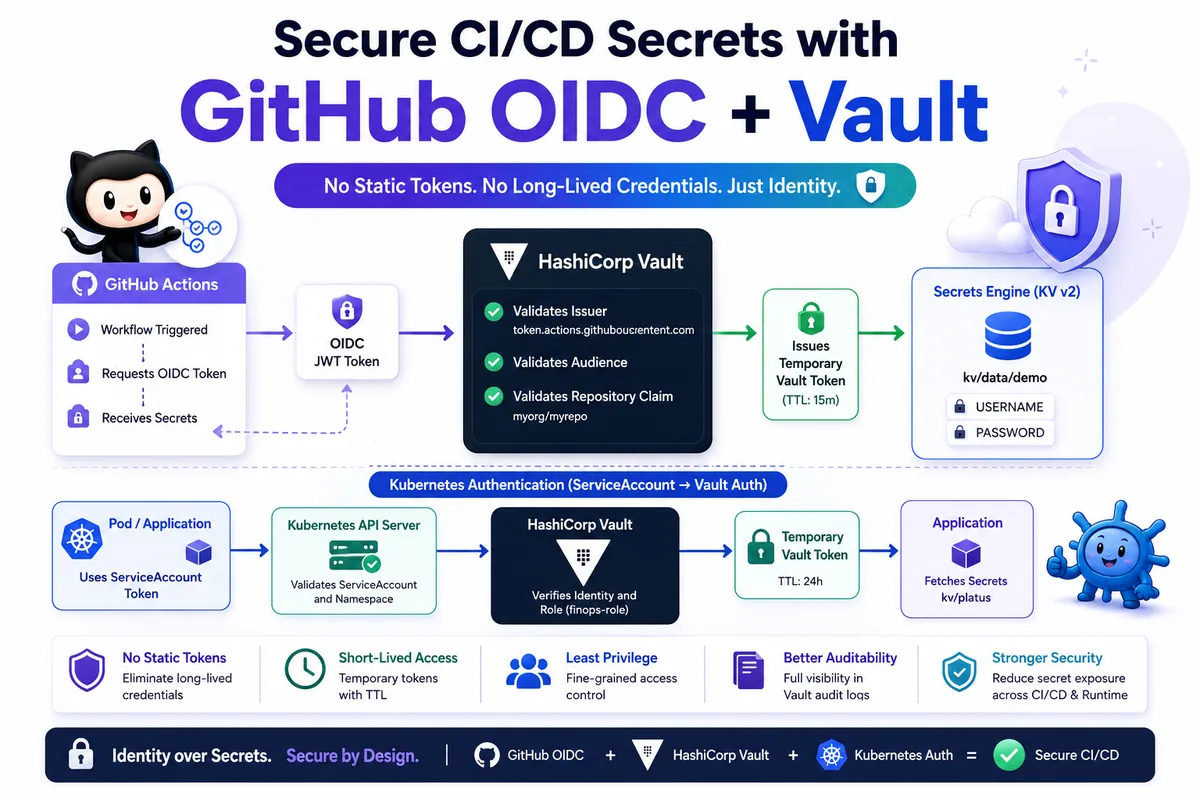
Modern applications require secure access to secrets throughout the software delivery lifecycle. From CI/CD pipelines to Kubernetes workloads, managing credentials securely is critical.
Traditionally, teams store Vault tokens, API keys, and other credentials as static secrets. This creates operational overhead and increases security risks.
HashiCorp Vault provides two powerful authentication methods that eliminate the need for long-lived credentials:
- GitHub OIDC Authentication for CI/CD pipelines
- Kubernetes Authentication for workloads running inside Kubernetes clusters
This blog explains how both authentication methods work and how to configure them for secure secret management.
Official Vault Documentation: https://developer.hashicorp.com/vault
Why Use Identity-Based Authentication
Identity-based authentication provides:
- No static Vault tokens
- No hardcoded credentials
- Short-lived authentication
- Improved auditability
- Better access control
- Reduced attack surface
- Easier credential management
For teams deploying applications on https://nife.io/platform, identity-based authentication simplifies secret management while improving security.
Part 1: GitHub OIDC Authentication with Vault
How GitHub OIDC Works
Authentication flow:
GitHub Actions
↓
Requests OIDC Token
↓
GitHub Issues JWT Token
↓
Vault JWT Authentication
↓
Vault Validates:
- Issuer
- Audience
- Repository Claim
↓
Vault Issues Temporary Token
↓
GitHub Reads Secrets
Instead of storing Vault credentials in GitHub Secrets, GitHub proves its identity using a signed JWT token.
Step 1: Start Vault Server
export VAULT_ADDR='http://127.0.0.1:8200'
export VAULT_TOKEN='ROOT_TOKEN'
Verify:
vault status
Step 2: Enable KV Secrets Engine
vault secrets enable -path=kv kv-v2
Verify:
vault secrets list
Step 3: Store Example Secrets
vault kv put kv/demo \
USERNAME="admin" \
PASSWORD="mypassword"
Verify:
vault kv get kv/demo
Step 4: Create Vault Policy
cat > demo-policy.hcl <<EOF
path "kv/data/demo" {
capabilities = ["read"]
}
EOF
vault policy write demo-policy demo-policy.hcl
Step 5: Enable JWT Authentication
vault auth enable jwt
Verify:
vault auth list
Step 6: Configure GitHub OIDC Provider
vault write auth/jwt/config \
oidc_discovery_url="https://token.actions.githubusercontent.com" \
bound_issuer="https://token.actions.githubusercontent.com" \
jwt_supported_algs="RS256" \
default_role="github-role"
Verify:
vault read auth/jwt/config
Step 7: Create Vault JWT Role
cat > role.json <<EOF
{
"role_type": "jwt",
"user_claim": "repository",
"bound_audiences": "https://token.actions.githubusercontent.com",
"bound_claims": {
"repository": "myorg/myrepo"
},
"policies": "demo-policy",
"ttl": "15m"
}
EOF
Replace myorg/myrepo with your GitHub repository.
vault write auth/jwt/role/github-role @role.json
Step 8: Add GitHub Secret
Navigate to:
Repository Settings
→ Secrets and Variables
→ Actions
Add:
| Secret Name | Value |
|---|---|
| VAULT_ADDR | https://your-vault-domain.com |
Step 9: Create GitHub Workflow
name: GitHub OIDC Vault Demo
on:
workflow_dispatch:
jobs:
demo:
runs-on: ubuntu-latest
permissions:
id-token: write
contents: read
steps:
- name: Checkout Repository
uses: actions/checkout@v4
- name: Authenticate to Vault
uses: hashicorp/vault-action@v2
with:
url: ${{ secrets.VAULT_ADDR }}
method: jwt
path: jwt
role: github-role
jwtGithubAudience: https://token.actions.githubusercontent.com
secrets: |
kv/data/demo USERNAME | USERNAME
kv/data/demo PASSWORD | PASSWORD
Step 10: Run the Workflow
Navigate to:
Actions
→ GitHub OIDC Vault Demo
→ Run Workflow
Expected:
USERNAME=***
PASSWORD=***
GitHub automatically masks secret values.
Part 2: Kubernetes Authentication with Vault
GitHub OIDC solves authentication for CI/CD pipelines.
For applications running inside Kubernetes, Vault provides Kubernetes Authentication.
Instead of using Vault tokens, applications authenticate using Kubernetes ServiceAccounts.
How Kubernetes Authentication Works
Application Pod
↓
ServiceAccount Token
↓
Vault Kubernetes Auth
↓
Vault Validates Token
↓
Vault Issues Temporary Token
↓
Application Reads Secrets
This allows workloads to securely access Vault without storing credentials.
Step 1: Enable Kubernetes Authentication
vault auth enable kubernetes
Verify:
vault auth list
Expected:
kubernetes/
Step 2: Create Vault Policy
cat > sampleapp-policy.hcl <<EOF
path "kv/data/sampleapp" {
capabilities = ["read"]
}
EOF
vault policy write sampleapp-policy sampleapp-policy.hcl
Step 3: Create ServiceAccount
apiVersion: v1
kind: ServiceAccount
metadata:
name: sampleapp-sa
namespace: sampleapp123
Apply:
kubectl apply -f sa.yaml
Step 4: Get Kubernetes API Information
Get Kubernetes API server:
kubectl config view --minify -o jsonpath='{.clusters[0].cluster.server}'
Example:
https://127.0.0.1:8443
Export CA certificate:
kubectl config view --raw --minify \
--flatten \
-o jsonpath='{.clusters[0].cluster.certificate-authority-data}' | base64 -d > ca.crt
Generate ServiceAccount token:
kubectl create token sampleapp-sa -n sampleapp123
Copy the generated token.
Step 5: Configure Vault Kubernetes Authentication
vault write auth/kubernetes/config \
token_reviewer_jwt="PASTE_TOKEN_HERE" \
kubernetes_host="https://127.0.0.1:8443" \
kubernetes_ca_cert=@ca.crt
If using Minikube, verify the API endpoint:
kubectl cluster-info
Use the correct Kubernetes API address if different.
Step 6: Create Vault Kubernetes Role
vault write auth/kubernetes/role/sampleapp-role \
bound_service_account_names=sampleapp-sa \
bound_service_account_namespaces=sampleapp123 \
policies=sampleapp-policy \
ttl=24h
This role maps Kubernetes identities to Vault policies.
Step 7: Update Deployment
Add ServiceAccount to your deployment:
spec:
serviceAccountName: sampleapp-sa
Step 8: Configure Application Environment Variables
Remove:
- name: VAULT_TOKEN
Use:
env:
- name: USE_VAULT
value: "true"
- name: VAULT_ADDR
value: "http://vault-ip:8200"
- name: VAULT_SECRET_PATH
value: "kv/sampleapp"
- name: VAULT_ROLE
value: "sampleapp-role"
Important:
Do not use:
http://127.0.0.1:8200
inside Kubernetes pods.
Use:
http://<vault-private-ip>:8200
or
https://vault.example.com
Step 9: Application Authentication Flow
Inside the pod:
/var/run/secrets/kubernetes.io/serviceaccount/token
Application calls:
/v1/auth/kubernetes/login
Vault validates the ServiceAccount token and returns a temporary Vault token.
The application can then read secrets from:
kv/sampleapp
Simplified GitHub Deployment Workflow
After moving authentication to Kubernetes workloads, GitHub no longer needs direct Vault access.
- name: Deploy
uses: appleboy/ssh-action@v1.1.0
with:
host: ${{ secrets.HOST_DNS }}
username: ${{ secrets.USERNAME }}
key: ${{ secrets.AWS_SSH_PRIVATE_KEY }}
script: |
kubectl set image deployment/sampleapp-deployment \
sampleapp-container=nife123/sampleapp:${VERSION} \
-n sampleapp123
kubectl rollout restart deployment/sampleapp-deployment -n sampleapp123
kubectl rollout status deployment/sampleapp-deployment -n sampleapp123
OIDC vs Kubernetes Authentication
| Feature | GitHub OIDC | Kubernetes Auth |
|---|---|---|
| Used By | CI/CD Pipelines | Running Applications |
| Identity Source | GitHub OIDC Token | ServiceAccount Token |
| Vault Token | Temporary | Temporary |
| Static Credentials | No | No |
| Recommended | Yes | Yes |
Best Practices
- Enable Vault audit logging
- Use HTTPS everywhere
- Apply least-privilege policies
- Restrict GitHub repositories using bound claims
- Restrict Kubernetes roles by namespace
- Use short token TTL values
- Rotate Kubernetes ServiceAccount credentials regularly
Conclusion
HashiCorp Vault provides multiple identity-based authentication mechanisms that eliminate the need for static credentials.
GitHub OIDC enables secure CI/CD authentication, while Kubernetes Authentication enables secure workload authentication using ServiceAccounts.
Together, these approaches improve security, simplify secret management, and provide a scalable foundation for cloud-native applications.
When combined with platforms like https://nife.io/solutions/deploy_containarized_apps, they help build secure and production-ready deployment workflows.
Learn more: https://nife.io
From the team at Nife
Deploy your next app in minutes, not days.
Nife is a multi-cloud edge platform that lets you deploy, scale, and manage applications globally without the infrastructure headache.