Automate Static Site Deployment with Nife & GitHub Actions
Set up automated GitHub Actions CI/CD for static sites on Nife in under 30 minutes. Step-by-step workflow, troubleshooting, and how Nife compares to Netlify, Vercel, and Cloudflare Pages.

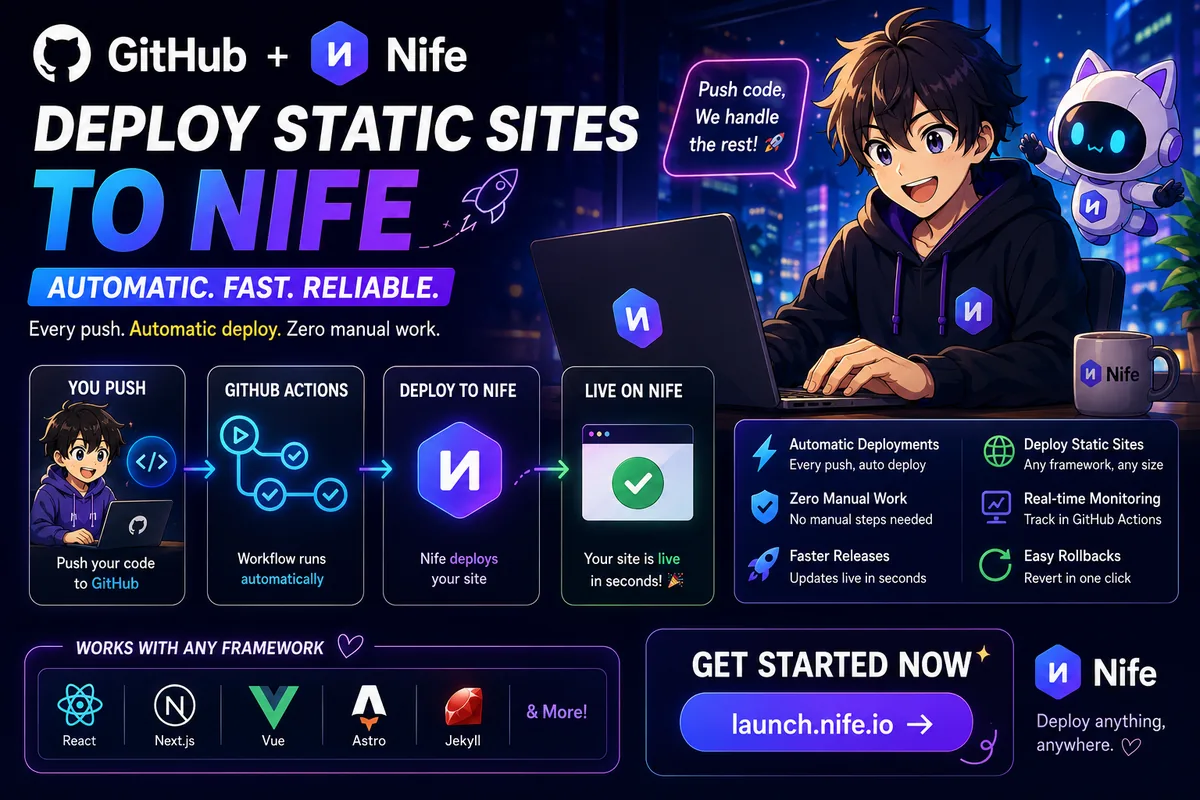
You finish a feature, push the code, and then the real work starts: build locally, archive the output, log into a dashboard, upload, and hope nothing breaks. By the time the change is live, the momentum is gone.
This guide shows you how to remove that step entirely using Nife and GitHub Actions, so every git push deploys your static site automatically — no manual build, no manual upload, no babysitting the release.
Table of Contents
- The Problem with Manual Deployments
- Nife + GitHub Actions: How It Works
- How Nife Compares to Netlify, Vercel, and Cloudflare Pages
- Step 1: Deploy Your Site to Nife
- Step 2: Set Up GitHub Actions CI/CD
- Step 3: Push Code and Verify Auto-Deployment
- Before vs. After: Real Numbers
- Troubleshooting: Common GitHub Actions + Nife Errors
- CI/CD Best Practices for Static Sites
- FAQ
The Problem with Manual Deployments
A typical manual release looks like this: build locally with npm run build, package the output, log into the hosting dashboard, upload the files, and watch closely in case something needs a rollback.
That workflow has four recurring costs:
- Time — 15 to 30 minutes per release, even for a one-line fix
- Error risk — a skipped build step ships stale code
- Inconsistency — every team member deploys slightly differently
- Stress — every release feels like it might break something
A CI/CD pipeline removes all four by making the deployment process identical, automatic, and unattended every time.
Nife + GitHub Actions: How It Works
Nife is a deployment platform for applications and static sites. Paired with GitHub Actions, a git push becomes the only deployment step you need:
You push code to GitHub
↓
GitHub Actions triggers automatically
↓
Your site builds and deploys to Nife
↓
Live in seconds
No manual build, no manual upload, no separate CI server to maintain.
How Nife Compares to Netlify, Vercel, and Cloudflare Pages
If you're evaluating where to run automated static-site deployments, you've likely already looked at Netlify, Vercel, or Cloudflare Pages — all three also support git-push-to-deploy out of the box. Here's how the GitHub Actions–driven CI/CD experience differs in practice:
| Platform | CI/CD trigger | Config approach | Best fit |
|---|---|---|---|
| Nife | GitHub Actions workflow (nife-actions) + nife.toml | Explicit YAML workflow you own and version-control | Teams who want a portable, framework-agnostic pipeline they fully control |
| Netlify | Native Git integration or GitHub Actions | Dashboard-driven, plugin ecosystem | Jamstack projects needing forms, identity, and split testing built in |
| Vercel | Native Git integration | Zero-config, framework-detected | Next.js-heavy stacks wanting tight framework integration |
| Cloudflare Pages | Native Git integration or GitHub Actions | Dashboard or Wrangler CLI | High-traffic static sites where unmetered bandwidth matters |
The practical difference is ownership of the pipeline. Netlify and Vercel's native integrations are largely dashboard-managed; all three of Vercel, Cloudflare Pages, and Netlify ship with git push-to-deploy out of the box, but the workflow itself typically lives in their platform, not your repo. Nife's approach keeps the actual CI/CD definition as a YAML file inside .github/workflows/, which means it's visible, diffable, and portable if you ever need to audit or migrate it.
On infrastructure: Cloudflare Pages is backed by a global edge network with 330+ data centers and offers unmetered bandwidth on its free tier, which is a relevant data point if your static site expects high traffic spikes. Vercel's strength remains native Next.js integration with zero-config support for ISR, image optimization, and middleware, making it the better default for Next.js-specific projects. If your priority is a CI/CD pipeline you fully control via a standard GitHub Actions file rather than a platform-managed integration, Nife's setup (covered below) is the more transparent option.
Step 1: Deploy Your Site to Nife
Your site needs to exist on Nife once before automation can take over.
Option A: Nife Dashboard
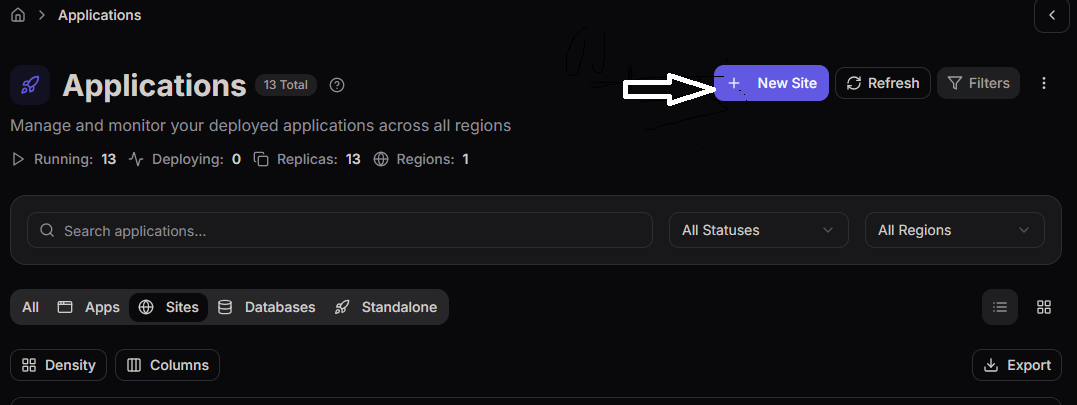
- Go to launch.nife.io and sign up or log in
- From the left navigation menu, go to Applications.
- Open the Sites tab.
- Click New Site.
- Provide your GitHub repository URL.
- Configure any settings you need.
- Click Deploy Site and watch your site go live.
Option B: nifectl CLI
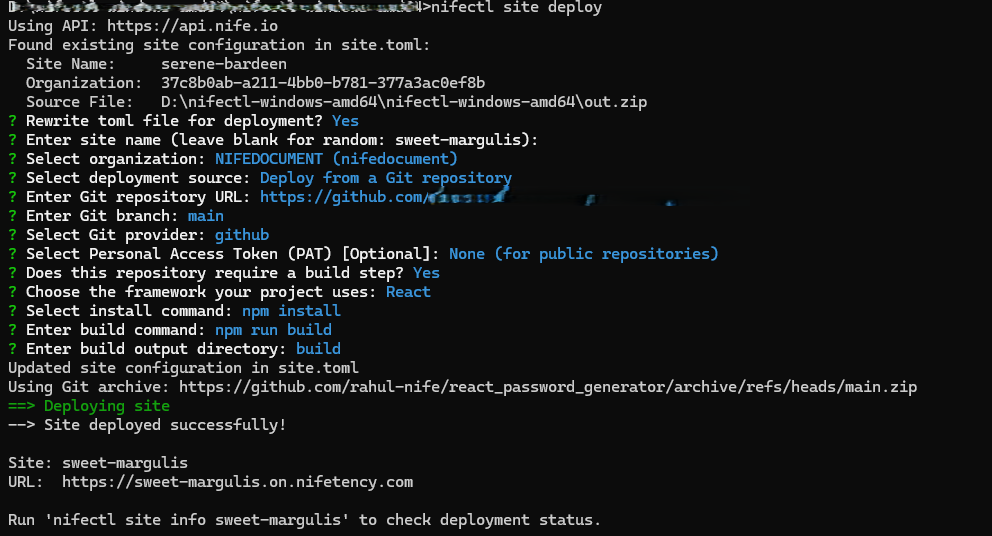
nifectl site deploy
You'll be prompted for a site name and your GitHub repository URL. The CLI handles configuration and deployment in one step — see the full nifectl site command reference for archive- and branch-based deploy options.
Why this matters: the first deployment generates the nife.toml configuration file — this file is what the automated pipeline reads on every subsequent push.
Step 2: Set Up GitHub Actions CI/CD
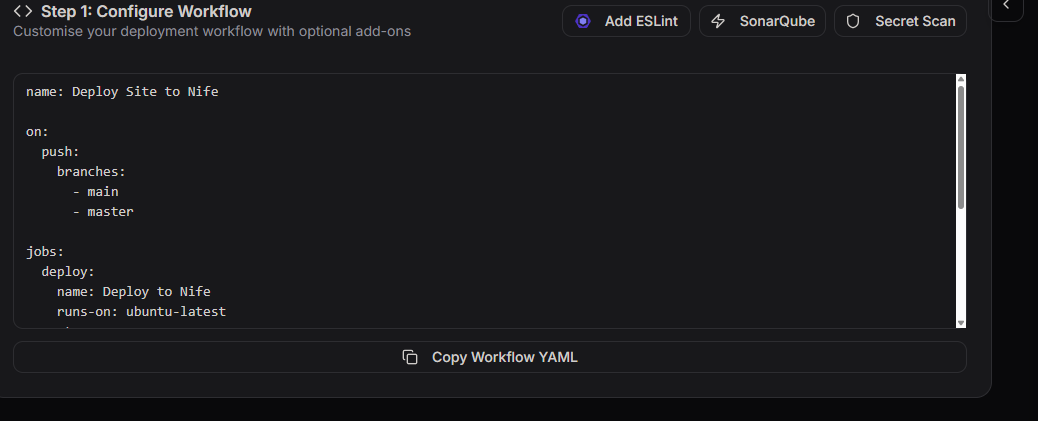
Once your site is live on Nife, the dashboard surfaces a Setup GitHub CI/CD button that walks through three steps.
2.1 Add the Workflow File
Create .github/workflows/main.yml in your repository with the workflow Nife generates:
on:
push:
branches:
- main
jobs:
deploy:
name: Deploy to Nife
runs-on: ubuntu-latest
steps:
- name: Checkout code
uses: actions/checkout@v4
- name: Deploy Site to Nife
uses: nifetency/nife-actions@2.4
env:
NIFE_ACCESS_TOKEN: ${{ secrets.NIFE_ACCESS_TOKEN }}
with:
args: "site redeploy --yes"
What each part does:
on: push: branches: main— triggers only on pushes tomain(customizable to any branch)steps— checks out your repository, then runs the Nife deploy action
Commit and push this file. GitHub now knows what to run on every push.
2.2 Add nife.toml to Your Repo
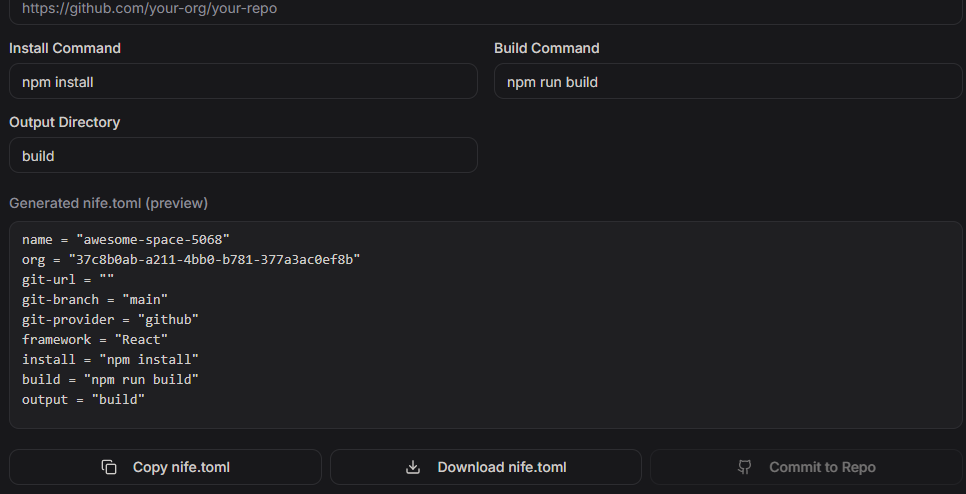
Download the configuration file from the dashboard and commit it to your repository root:
git add nife.toml
git commit -m "Add Nife configuration"
git push
This file tells the pipeline which site to deploy and where the build output lives.
2.3 Add Your Access Token as a GitHub Secret
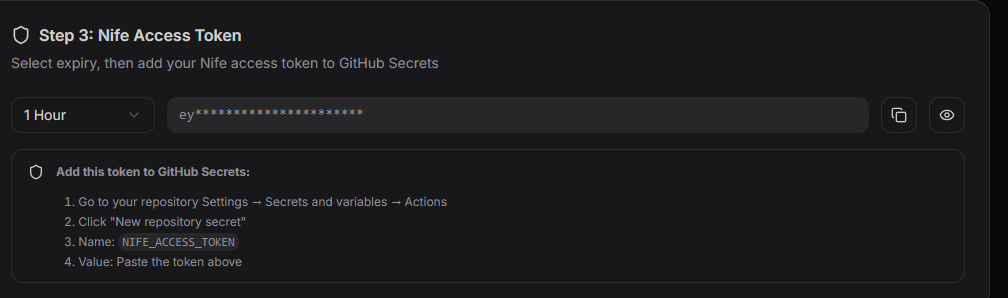
Generate an access token from the Nife dashboard — choose a 1-hour token for testing or a long-lived token for ongoing automation (rotate it periodically for security). You can also manage tokens via the nifectl secrets command if you prefer the CLI.
In your GitHub repository:
- Settings → Secrets and variables → Actions (see GitHub's encrypted secrets docs for full details)
- New repository secret
- Name:
NIFE_ACCESS_TOKEN - Value: paste the token from Nife
- Save
GitHub can now authenticate with Nife on your behalf.
Step 3: Push Code and Verify Auto-Deployment
Make any change, then push:
git commit -m "Update homepage styles"
git push
In the Actions tab of your repository, you'll see the workflow run live: checkout, then deploy, then a success status. Every push to main from this point repeats the same pipeline automatically.
Before vs. After: Real Numbers
Manual deployment
$ npm run build
# package output, upload manually, verify
# Total time: ~15 minutes, hands-on, consistency varies by person
Automated deployment
$ git commit -m "Deploy redesigned homepage"
$ git push
# GitHub Actions: checkout → deploy → live
# Total time: under a minute, no manual steps, identical every time
At 3–5 deploys a week, manual releases cost roughly 1–2.5 hours weekly — 50 to 100 hours a year. Automating that pipeline doesn't just save time; it removes the variability that causes bad releases in the first place.
Troubleshooting: Common GitHub Actions + Nife Errors
Workflow doesn't trigger
Confirm the file is at exactly .github/workflows/main.yml, the YAML indentation is valid, and the file is committed to the branch you're pushing to.
"Token not found" or auth error
Check Settings → Secrets and variables → Actions for NIFE_ACCESS_TOKEN. If missing or expired, generate a new token from the Nife dashboard and re-add it.
Deployment times out
Add timeout-minutes: 15 to the job in your workflow file for larger sites, and check the Actions run logs for the specific step that stalled.
Site doesn't reflect the latest push
Verify nife.toml is in the repository root with the correct site name. Propagation can take up to 30 seconds after a successful deploy.
The GitHub Actions logs are the fastest way to diagnose any of the above — they show exactly which step failed and why.
CI/CD Best Practices for Static Sites
For broader DevOps strategy beyond this single pipeline, Nife's DevOps Handbook covers additional patterns. For this workflow specifically:
- Protect the main branch with required reviews before merge, so nothing untested triggers a production deploy
- Write descriptive commit messages — since every commit can trigger a deploy, "fix" tells you nothing later
- Rotate access tokens on a schedule rather than leaving long-lived tokens unchanged indefinitely
- Check the Actions tab after pushing to main — a 10-second glance catches issues before users do
- Comment your workflow file so the next person (or future you) understands the pipeline without reverse-engineering it
FAQ
Does Nife support frameworks other than static HTML/CSS/JS?
The workflow above works for any static build output — React, Vue, Svelte, or plain static sites — as long as your build command produces a static output directory referenced in nife.toml. See Deploy by Language in the Nife docs for framework-specific notes.
Can I trigger deploys from a branch other than main?
Yes — change branches: - main in the workflow file to any branch name, or add multiple branches to the list.
Is Nife a replacement for Netlify or Vercel? It depends on your priorities. Cloudflare Pages, Netlify, and Vercel are the three dominant platforms for static site hosting, and choosing between them depends on cost, performance, developer experience, or framework support. Nife's differentiator is a GitHub Actions–native pipeline you own as a versioned file in your own repo, rather than a platform-managed integration.
How long does the full setup take? Typically under 30 minutes for the first-time setup — deploying the initial site, adding the workflow file, and configuring the access token.
Next Step
- Deploy your site to Nife via the dashboard or
nifectl - Add the GitHub Actions workflow and
nife.toml - Push code — automation handles the rest
Get started at launch.nife.io.
Further reading:
© Nife — Deploy anything, anywhere
From the team at Nife
Deploy your next app in minutes, not days.
Nife is a multi-cloud edge platform that lets you deploy, scale, and manage applications globally without the infrastructure headache.