Mastering Stripe Integration: Checkout, Payment Elements, and Direct Links Explained
A deep dive into the three main ways to integrate Stripe — Checkout, Payment Elements, and Direct Product Links — along with a look at test vs. live modes, and a real-world architecture example of a React + Express integration workflow.


Mastering Stripe Integration: Checkout, Payment Elements, and Direct Links Explained
When it comes to accepting payments online, Stripe stands out as one of the most developer-friendly and powerful platforms. Whether you’re building a SaaS platform, an e-commerce app, or a subscription-based service — integrating Stripe the right way can make or break the user experience.
In this guide, we’ll explore the three main Stripe integration types — Stripe Checkout, Stripe Payment Elements, and Stripe Direct Links — and how they fit into modern web app architectures.
We’ll also cover the difference between Test Mode and Live Mode, and how to safely move from sandbox testing to real-world payments.
Understanding the Stripe Integration Landscape
Stripe provides multiple ways to collect payments — from hosted checkout pages to custom-built flows. Each method has its pros and cons depending on your product’s needs, technical control, and compliance requirements.
Let’s break down the three main integration types
1. Stripe Checkout — Fastest and Most Secure Setup
Stripe Checkout is a hosted payment page managed entirely by Stripe. When users click “Subscribe” or “Buy,” they are redirected to a Stripe-hosted page to complete the payment.
✅ Advantages:
- Handles UI, validation, and compliance automatically (e.g., SCA, PCI).
- Minimal setup — just create a session via API and redirect.
- Works with one-time payments and subscriptions.
- Extremely secure — card data never touches your servers.
⚙️ Implementation Flow:
- Your backend creates a Checkout Session via Stripe API.
- Stripe returns a session URL.
- The frontend redirects the user to that URL.
- Upon successful payment, Stripe redirects the user back to your site.
🚀 Best For:
- Quick integrations
- Teams without a dedicated frontend payment UI
- Businesses prioritizing compliance and simplicity over full customization
2. Stripe Payment Element — Seamless Embedded Checkout
This is often referred to as the “Stripe Elements” or “Payment Element” integration.
It lets you embed the payment form directly inside your app, keeping users on your site while still ensuring PCI compliance.
Unlike Checkout (which redirects users), Payment Element works via Stripe.js — allowing full control over the page flow and user experience.
✅ Advantages:
- Fully on-page checkout — no redirects.
- Customizable UI to match your brand.
- Works perfectly for subscription flows (with
client_secret). - Built-in security and compliance handled by Stripe.
⚙️ Implementation Flow (Your Architecture Example):
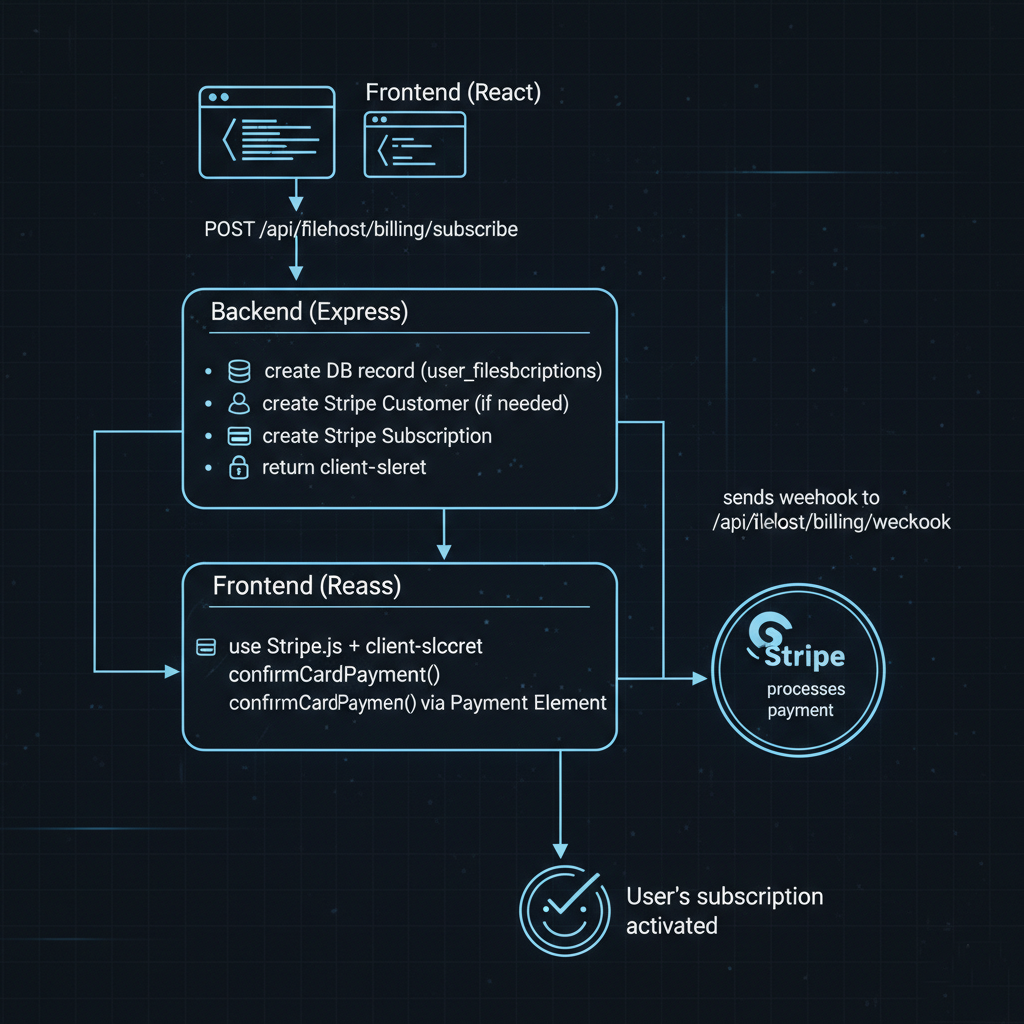
🚀 Best For:
- SaaS subscriptions and recurring payments
- Apps that want an embedded checkout experience
- Teams comfortable handling backend logic (customer + subscription creation)
3. Stripe Direct Product Links — Simple Yet Limited
This is the most lightweight option — where you create a product in Stripe Dashboard and use a direct payment link.
Users click the link and go straight to a Stripe-hosted payment page for that product.
No backend coding or API setup is required.
✅ Advantages:
- Easiest to set up — no code needed.
- Secure and hosted by Stripe.
- Great for quick launches or marketing pages.
⚠️ Limitations:
- Not customizable.
- Hard to sync payment status automatically with your app.
- Not ideal for dynamic subscriptions or user-linked payments.
🚀 Best For:
- Freelancers, donations, or one-off products
- MVPs or landing page experiments
- Simple businesses with few SKUs
Stripe Test Mode vs Live Mode
Stripe provides two environments — Test Mode and Live Mode — each with distinct purposes.
🧪 Test Mode
- Used during development and staging.
- Supports test API keys and test cards (like
4242 4242 4242 4242). - Payments are simulated — no money moves.
- Webhooks and events behave identically to live mode for testing flows.
You can build, debug, and even automate webhook responses in this environment without risk.
💳 Live Mode
- Used in production.
- Requires live API keys and real payment methods.
- Funds are actually transferred to your Stripe account.
- Same endpoints, just different keys.
💡 Pro Tip:
You can safely deploy your production app using Live Mode but still test flows using Test Cards if you restrict routes to test users or staging accounts.
Choosing the Right Integration
| Integration Type | Redirects User | Custom UI | Best For | Setup Difficulty |
|---|---|---|---|---|
| Stripe Checkout | ✅ Yes | ❌ Minimal | Fast setup & high security | ⭐ Easy |
| Payment Element | ❌ No | ✅ Full | SaaS subscriptions & custom UIs | ⭐⭐ Moderate |
| Direct Link | ✅ Yes | ❌ None | Simple one-off products | ⭐ Very Easy |
Final Thoughts
Stripe gives developers unmatched flexibility — whether you need a quick hosted checkout or a deeply integrated subscription workflow.
In most production-grade web apps (like a SaaS with user billing), the Stripe Payment Element approach offers the best balance between user experience, control, and security.
It lets you keep users inside your app, while Stripe handles all sensitive data behind the scenes.
If you’re starting out, begin with Test Mode, verify your webhook flows, and then move confidently to Live Mode when you’re ready to collect real payments.
About Stripe
Stripe is a global payment infrastructure that powers millions of businesses — from startups to Fortune 500s. It simplifies online payments, subscriptions, and invoicing, while maintaining compliance, security, and scalability across industries.
Learn more at stripe.com/docs.
From the team at Nife
Deploy your next app in minutes, not days.
Nife is a multi-cloud edge platform that lets you deploy, scale, and manage applications globally without the infrastructure headache.