Shadow Deployment: Test in Production Without Risk
Shadow deployment mirrors real production traffic to a new version without affecting users. Learn how it works, when to use it and how to set it up safely.

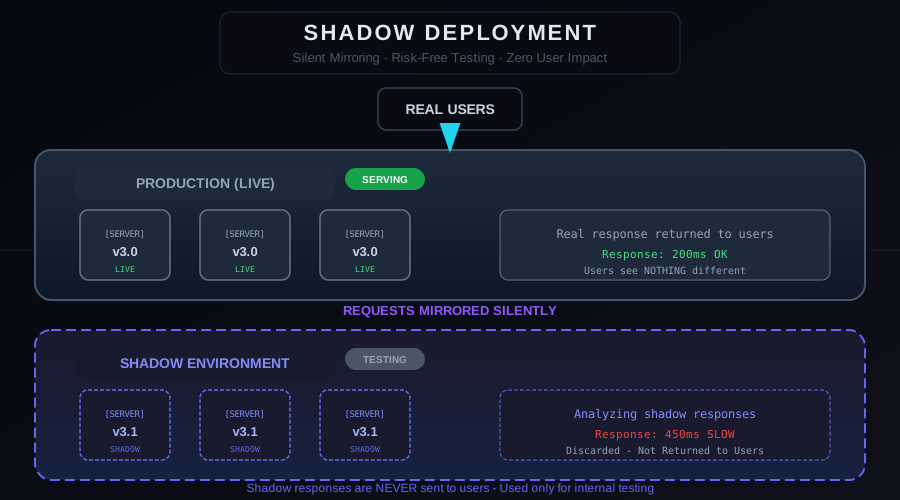
You can stage all you want. You can write thousands of tests. But nothing simulates production like actual production traffic — the unpredictable mix of real user requests, real data volumes, and real edge cases that no synthetic test suite can replicate. Shadow deployment — one of the most distinctive types of deployment strategies — solves this by letting your new version process production traffic without any users ever knowing it exists.
What Is Shadow Deployment?
In a shadow deployment, you deploy a new version of your service (the shadow) alongside the current production version. Every incoming request is duplicated — the original goes to production as normal, and an identical copy (the mirror) is sent to the shadow service.
The shadow service processes the mirrored request, generates a response, and that response is silently discarded. Users see only the production response. From their perspective, nothing has changed. But behind the scenes, your new version is processing every single request in real time, surfacing bugs, performance regressions, and behavioral differences that only emerge under real-world conditions.
This technique goes by several names: shadow deployment, mirrored deployment, dark launch, and traffic mirroring. The concept is the same regardless of the name.
How Shadow Traffic Mirroring Works
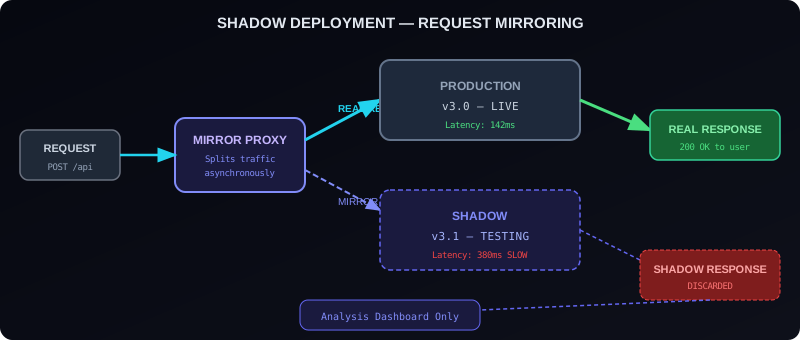
The request mirroring flow has four steps.
1. Request arrives — A user sends a request to your application. The request hits your load balancer, API gateway, or service mesh proxy.
2. Mirror proxy duplicates — The proxy makes a copy of the request and routes it in two directions simultaneously: the original to the production service, and the copy to the shadow service.
3. Production responds — The production service handles the request and returns the response to the user. This path is unchanged, with no added latency.
4. Shadow discards — The shadow service processes its copy and generates a response, but that response is thrown away. Any errors from the shadow have zero user impact.
Why Use Shadow Deployment?
Shadow deployment addresses a category of risk that other deployment strategies cannot — the gap between synthetic testing and real-world behavior.
Database query performance — A new query might be fast in tests with 100,000 rows but catastrophically slow in production with 50 million. Shadow deployment exposes this before you route real users.
Concurrency and race conditions — Race conditions are notoriously hard to reproduce in tests. Shadow traffic naturally surfaces them because you are processing the same concurrent request patterns as production.
Data shape variations — Real user data contains formats, edge cases, and malformed inputs that test data rarely includes. Shadow traffic stress-tests your input handling with the full diversity of production requests.
Third-party API behavior — Shadow requests hit real external services, revealing timeout patterns and rate limiting behavior that staging environments rarely exercise.
Memory leaks — Memory leaks only manifest over hours or days under sustained load. Shadow deployment lets you observe memory growth in the new version over time without user impact.
Shadow vs Canary vs Blue-Green
It is worth understanding where shadow deployment fits relative to other strategies.
| Aspect | Shadow | Canary | Blue-Green |
|---|---|---|---|
| User impact | Zero | Partial (small %) | Full switch |
| Response used | Discarded | Real | Real |
| Risk | Lowest | Low | Medium |
| Traffic type | Real requests, synthetic load | Real users, real responses | Real users, real responses |
| Best for | Validating behavior before any exposure | Staged production rollout | Instant switch with rollback |
Shadow deployment is not a replacement for canary or blue-green. It is a stage that comes before them. Use shadow deployment to validate that your new version works correctly, then use canary to roll out to real users gradually.
Implementing Shadow Deployment with NGINX
NGINX supports request mirroring via the mirror module. The shadow service receives a copy of every request at the specified URI.
location /api/ {
# Route production traffic normally
proxy_pass http://production-service;
# Mirror all requests to shadow service
mirror /api/shadow;
mirror_request_body on;
}
location /api/shadow {
internal;
proxy_pass http://shadow-service;
# Suppress error logging from shadow
proxy_ignore_client_abort on;
}
The internal directive ensures the shadow endpoint is only reachable from the NGINX mirror directive, not directly from external requests.
What to Measure in the Shadow
Collecting the right data from your shadow environment is what makes shadow deployments valuable rather than just technically interesting.
Response time comparison — Compare shadow P50/P95/P99 latency against production for each endpoint. Regressions are immediately visible.
Error rate comparison — Compare HTTP status codes and application-level errors between shadow and production. Any new error class in the shadow warrants investigation.
Response body diffing — For read APIs, you can compare the shadow response body against the production response body. Differences reveal behavioral changes in your business logic.
Resource utilization — Track CPU, memory, and database connection counts in the shadow. Unusual growth patterns indicate performance problems.
Limitations and Considerations
Write operations — Shadow traffic must not trigger real side effects. If your endpoint writes to a database, sends emails, or charges payment methods, the shadow service must be configured to suppress these side effects. This typically requires feature flags or a separate shadow database.
Double infrastructure cost — Running the shadow requires the same compute as production. For high-traffic services, this can be significant. Many teams run shadow testing for a limited time window rather than continuously.
Response comparison complexity — Comparing responses automatically is straightforward for simple read APIs but complex for endpoints that return timestamps, random IDs, or non-deterministic data.
External service calls — Mirrored requests will hit your external services twice. Rate-limited APIs, payment processors, and analytics providers may have issues with doubled request volumes from the shadow.
A Practical Shadow Testing Checklist
Before enabling shadow mirroring for a new version:
- Identify all write operations and ensure the shadow version suppresses side effects
- Set up a separate shadow database or use read-only mode
- Configure monitoring dashboards to show shadow vs production metrics side-by-side
- Define thresholds: what error rate difference or latency regression triggers a "not ready" verdict?
- Plan for external API impacts and add circuit breakers if needed
- Decide the minimum shadow observation period (typically 24–72 hours for significant services)
Conclusion
Shadow deployment gives you something no other strategy offers — the ability to run your new version against 100% of real production traffic before a single user ever sees it. For high-stakes services where reliability is paramount, the operational investment in shadow testing pays for itself many times over when it surfaces the production-only bug that would have caused an incident.
Related: Shadow Deployment on Kubernetes with Istio | Canary Deployment Guide
From the team at Nife
Deploy your next app in minutes, not days.
Nife is a multi-cloud edge platform that lets you deploy, scale, and manage applications globally without the infrastructure headache.