Blue-Green Deployment: Zero-Downtime Releases Explained
Blue-green deployment runs two identical production environments so you can switch traffic instantly and roll back in seconds. Steps, benefits and best practices.

Downtime is expensive. Whether you are running an e-commerce platform, a SaaS product, or a fintech application, every second your service is unavailable costs you users, revenue, and trust. Traditional deployment methods often require a maintenance window that disrupts users. Blue-green deployment was invented specifically to solve this problem.
Blue-green deployment is one of the most reliable types of deployment strategies in modern DevOps. It allows engineering teams to release new versions of software with absolutely zero downtime, and to roll back in seconds if something goes wrong.
What Is Blue-Green Deployment?
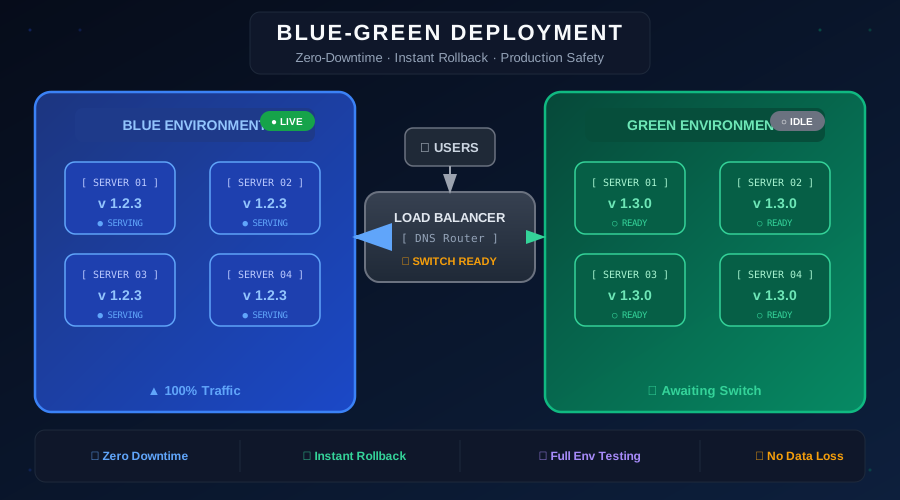
Blue-green deployment is a release strategy that reduces downtime and risk by running two identical production environments, called Blue and Green. At any point in time, only one environment is live and serving user traffic, while the other is idle and ready to receive the next version of your application.
- Blue environment – The currently live environment serving 100% of production traffic
- Green environment – The idle environment where the new version is deployed and tested
When you are ready to release, you deploy to the green environment, run your tests and health checks, and then switch the load balancer to point all traffic to green. The switch is instant — users experience no downtime. The old blue environment stays running as a fallback.
How Does the Traffic Switch Work?
The traffic switch happens at the load balancer or DNS level. When you change the routing rule, all incoming requests are immediately directed to the new environment. Because the green environment was already warm and running before the switch, users do not notice any interruption.
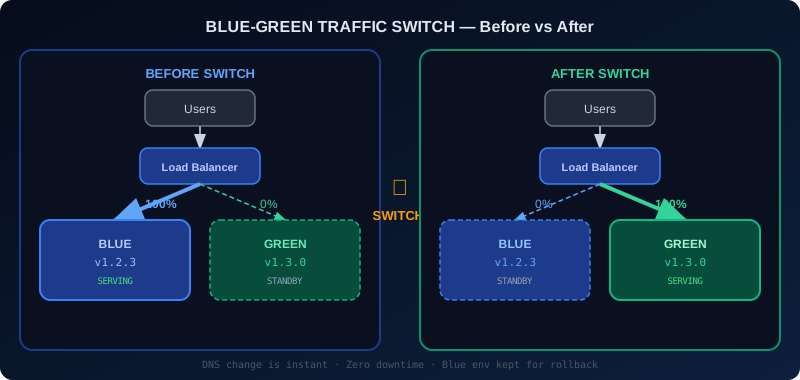
The switch itself is instantaneous. Unlike a rolling update where instances are replaced one by one, the blue-green switch happens atomically — one moment 100% of traffic goes to blue, the next moment 100% goes to green. This atomic nature is what makes blue-green so powerful for high-availability systems.
Benefits of Blue-Green Deployment
Zero Downtime
Because the green environment is fully running before any traffic is switched, there is no window during which your application is unavailable. Users never see a maintenance page or experience service interruptions.
Instant Rollback
If a problem is detected after the switch, reverting is as simple as pointing the load balancer back to the blue environment. This rollback takes seconds and requires no redeployment. The old version is still running and healthy.
Full Environment Testing
Before switching traffic, you can run your complete test suite against the green environment using real production infrastructure. You can verify that your application starts correctly, connects to databases, processes messages from queues, and passes all integration tests — something you simply cannot do with a rolling update.
Separation of Deployment from Release
With blue-green, deploying your code and releasing it to users are two separate events. You can deploy to green days in advance, run smoke tests, and release only when you are fully confident. This separation dramatically reduces release anxiety for engineering teams.
Drawbacks to Consider
Infrastructure Cost
Running two identical production environments means your infrastructure costs roughly double during deployments. For large-scale systems, this can be a significant cost factor. Cloud spot instances and scheduled scaling can help mitigate this.
Database Migrations
The trickiest part of blue-green deployments is managing database schema changes. Both environments typically share the same database. If your new version requires a schema change incompatible with the old version, you must use forward-compatible, additive migrations.
Session State
If your application stores session state in memory, users on the blue environment will lose sessions when you switch to green. For stateless applications or those using external session stores like Redis, this is not a concern.
Step-by-Step Implementation
Step 1: Deploy the New Version to Green
# Deploy new version to green environment
./deploy.sh --env green --version v1.3.0
# Wait for all instances to pass health checks
./wait-for-healthy.sh --env green --timeout 300
Step 2: Run Smoke Tests Against Green
# Run smoke tests against green load balancer
pytest tests/smoke/ --base-url https://green.internal.myapp.com
Step 3: Switch the Load Balancer
# AWS ALB - update target group to green
aws elbv2 modify-listener \
--listener-arn arn:aws:elasticloadbalancing:region:account:listener/... \
--default-actions Type=forward,TargetGroupArn=...green-tg...
Step 4: Monitor and Maintain Rollback Capability
After the switch, monitor your metrics closely. Keep the blue environment running for at least 24 hours so you can roll back instantly if needed.
# Rollback - switch listener back to blue
aws elbv2 modify-listener \
--listener-arn arn:aws:elasticloadbalancing:region:account:listener/... \
--default-actions Type=forward,TargetGroupArn=...blue-tg...
Blue-Green in CI/CD Pipelines
Integrating blue-green into your CI/CD pipeline automates the entire process. Tools like AWS CodeDeploy, GitHub Actions, and Spinnaker have native support for blue-green deployments.
A typical CI/CD pipeline for blue-green looks like this:
- Code is merged to the main branch
- CI pipeline builds and tests the Docker image
- The pipeline deploys the image to the green environment
- Automated smoke tests run against green
- On test success, the pipeline switches traffic to green
- Blue environment is kept running for the rollback window
- After 24 hours with no incidents, blue is terminated or recycled
Best Practices
- Use health checks to verify the green environment is fully ready before switching
- Automate the switch to remove human error from the critical path
- Monitor key metrics like error rate, latency, and throughput for 30 minutes after every switch
- Keep database migrations additive to maintain backward compatibility between blue and green
- Use feature flags in combination with blue-green to decouple deployment from feature activation
Blue-Green vs Other Strategies
- Canary Deployment – Sends a small percentage of traffic to the new version first, reducing blast radius
- Ramped Deployment – Replaces instances one at a time, maintaining capacity throughout
- Shadow Deployment – Runs the new version in parallel without routing real user traffic to it
Blue-green is best when you need the simplest, most reliable mechanism for zero-downtime deployments with instant rollback capability.
Simplify Deployments with Nife
Nife supports blue-green deployment as a deployment strategy.
Conclusion
Blue-green deployment is a battle-tested strategy that eliminates the fear of production releases. By maintaining two environments and switching traffic atomically, you get zero downtime, instant rollback capability, and the confidence that comes from testing on production-identical infrastructure. If your application requires high availability, blue-green deployment should be in your toolbox. For a step-by-step implementation with YAML and a full CI/CD pipeline, see our guide on blue-green deployment on Kubernetes.
From the team at Nife
Deploy your next app in minutes, not days.
Nife is a multi-cloud edge platform that lets you deploy, scale, and manage applications globally without the infrastructure headache.