Ramped Deployment: Gradual Rollouts, Zero Downtime
Ramped deployment, also called a rolling update, replaces old instances with new ones in steps so the app stays up. Kubernetes setup and when to choose it.

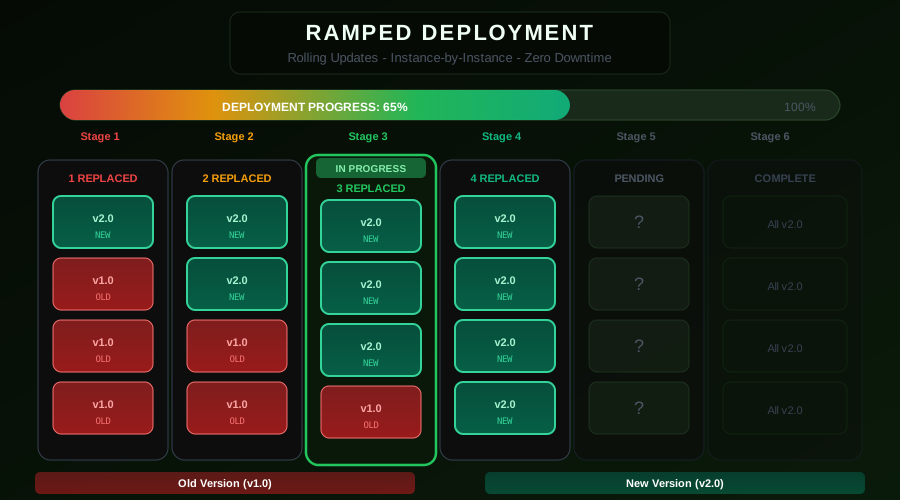
The ramped deployment strategy — also called rolling update or rolling deployment — is the most widely used of all types of deployment strategies for zero-downtime deployments. Instead of switching all traffic at once or running a parallel environment, it replaces old instances with new ones gradually, a few at a time, until the entire fleet is running the new version.
How Ramped Deployment Works
Imagine you have 10 instances of your application running version 1.0. A ramped deployment works like this:
- Take 2 instances offline (or add 2 new ones alongside)
- Start version 2.0 on those 2 instances
- Wait for them to pass health checks
- Route traffic to the new instances
- Repeat until all 10 instances run version 2.0
Throughout this process, your application is always serving requests. At any given moment, some instances run v1.0 and others run v2.0, but users always have healthy instances to connect to.
The key parameters that control a ramped deployment are:
- maxUnavailable — Maximum number of instances that can be down at any time
- maxSurge — Maximum number of extra instances that can be created above the desired replica count
- readinessProbe — Health check that must pass before an instance receives traffic
The Ramped Deployment Timeline
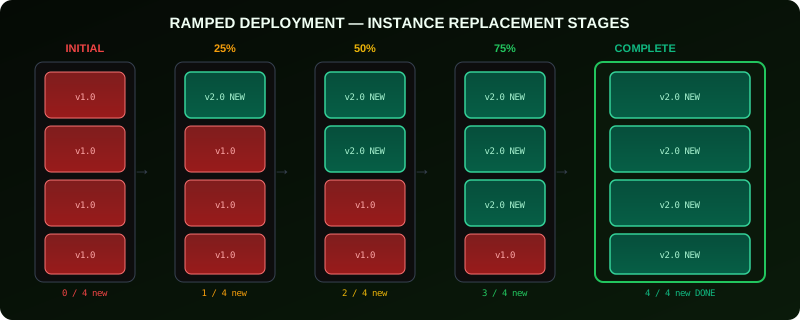
The timeline has five visible stages:
Initial state — All instances run v1.0. The deployment begins.
25% replaced — The first batch of instances (2–3 out of 10) now run v2.0. The rest still run v1.0.
50% replaced — Half the fleet runs the new version. If you have been monitoring metrics, this is a natural checkpoint.
75% replaced — Most traffic flows through v2.0 instances. Only a few v1.0 instances remain.
Complete — All instances run v2.0. Old instances are terminated.
Implementing Ramped Deployment on Kubernetes
Kubernetes implements ramped deployment through the RollingUpdate strategy on a Deployment resource. This is actually the default strategy in Kubernetes.
apiVersion: apps/v1
kind: Deployment
metadata:
name: my-api
namespace: production
spec:
replicas: 10
strategy:
type: RollingUpdate
rollingUpdate:
maxUnavailable: 2 # at most 2 old pods down at once
maxSurge: 2 # at most 2 extra pods above desired count
selector:
matchLabels:
app: my-api
template:
metadata:
labels:
app: my-api
spec:
containers:
- name: my-api
image: my-registry/my-api:v2.0.0
ports:
- containerPort: 8080
readinessProbe:
httpGet:
path: /health
port: 8080
initialDelaySeconds: 10
periodSeconds: 5
failureThreshold: 3
livenessProbe:
httpGet:
path: /health
port: 8080
initialDelaySeconds: 30
periodSeconds: 10
To trigger a rolling update, simply update the image:
kubectl set image deployment/my-api \
my-api=my-registry/my-api:v2.0.0 \
-n production
# Watch the rollout progress
kubectl rollout status deployment/my-api -n production
Understanding maxUnavailable and maxSurge
These two parameters define the speed and safety profile of your rollout.
High availability, slow rollout:
rollingUpdate:
maxUnavailable: 0
maxSurge: 1
Zero pods are ever taken offline. One extra pod is created, it must become ready, then one old pod is removed. This is the safest setting — you always have full capacity — but it is the slowest.
Faster rollout, brief capacity reduction:
rollingUpdate:
maxUnavailable: 3
maxSurge: 0
Three old pods are terminated at once, three new pods are started. Total capacity drops temporarily but no extra infrastructure is used.
Balanced:
rollingUpdate:
maxUnavailable: 1
maxSurge: 1
One old pod comes down, one new pod comes up. Total pod count stays close to desired at all times. This is a good default for most services.
Readiness Probes Are Non-Negotiable
The readiness probe is what makes rolling updates work safely. Kubernetes will not remove an old pod until the new pod passes its readiness check. Without a readiness probe, Kubernetes sends traffic to new pods immediately after they start — before your application has finished initializing.
readinessProbe:
httpGet:
path: /ready
port: 8080
initialDelaySeconds: 10
periodSeconds: 5
successThreshold: 1
failureThreshold: 3
Your /ready endpoint should check actual application readiness: database connections established, caches warm, dependent services reachable.
Pausing and Resuming a Rollout
Kubernetes lets you pause a rollout mid-way, observe metrics, and then continue or roll back.
# Pause the rollout at current state
kubectl rollout pause deployment/my-api -n production
# Check current state
kubectl rollout status deployment/my-api -n production
# Resume if metrics look good
kubectl rollout resume deployment/my-api -n production
# Or roll back to previous version
kubectl rollout undo deployment/my-api -n production
This manual checkpoint pattern is effective for large deployments where you want to validate behavior at the 25% and 50% marks before proceeding.
Monitoring During a Ramped Rollout
Monitor these metrics throughout the rollout:
# Pods by version during rollout
count(kube_pod_labels{label_app="my-api"}) by (label_version)
# Error rate during rolling update
sum(rate(http_requests_total{job="my-api",status=~"5.."}[2m])) /
sum(rate(http_requests_total{job="my-api"}[2m]))
# Rollout progress
kube_deployment_status_updated_replicas{deployment="my-api"} /
kube_deployment_spec_replicas{deployment="my-api"}
An increase in error rate during a rollout is a strong signal to pause and investigate.
Session Persistence Considerations
Ramped deployments are tricky when users have sessions tied to specific instances. If a user's session is on a v1.0 pod that gets replaced, their session may be lost mid-interaction.
Solutions:
- Externalize session state to Redis or a distributed cache so any instance can serve any session
- Use sticky sessions at the load balancer level, but be aware this can cause uneven traffic distribution during the rollout
- Set
terminationGracePeriodSecondslong enough for in-flight requests to complete
spec:
template:
spec:
terminationGracePeriodSeconds: 60
containers:
- name: my-api
lifecycle:
preStop:
exec:
command: ["/bin/sh", "-c", "sleep 15"]
Benefits and Limitations
Benefits:
- No extra infrastructure required (zero cost overhead vs blue-green)
- Native Kubernetes support with built-in tooling
- Automatic rollback if pod readiness fails
- Fine-grained speed control via maxUnavailable/maxSurge
Limitations:
- Both versions run simultaneously during the rollout (can cause API compatibility issues)
- Rollback is slower than blue-green (must roll forward or roll back one batch at a time)
- Not suitable for schema migrations that break backwards compatibility
Conclusion
Ramped deployment is the right default for most stateless applications. Its zero-extra-infrastructure requirement, native Kubernetes support, and built-in rollback make it operationally simple. The key to making it work reliably is well-defined readiness probes and monitoring dashboards that catch regressions at the first sign.
Related: Rolling Updates vs Ramped Deployment Comparison | Ramped Slow Deployment for Mission-Critical Systems
From the team at Nife
Deploy your next app in minutes, not days.
Nife is a multi-cloud edge platform that lets you deploy, scale, and manage applications globally without the infrastructure headache.