Ramped Slow Deployment: Enterprise Best Practices
How enterprises run ramped slow deployments: change management, automated gate checks, rollback runbooks and cross-team coordination for safer releases.

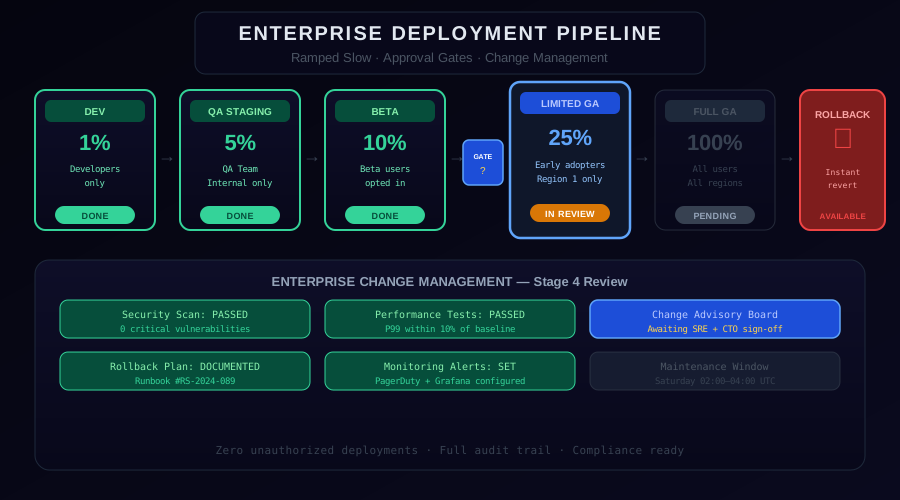
Large enterprises have hard-won knowledge about production releases: the more critical the system, the more process it deserves. Ramped slow deployment is not just a technical pattern — it is a release discipline that pairs with a mature CI/CD pipeline to deliver reliable, auditable releases across engineering, operations, and business stakeholders. This guide covers the enterprise-grade patterns that make slow deployments reliable, auditable, and repeatable.
The Enterprise Deployment Pipeline
This illustrative Tier 1 enterprise deployment pipeline has seven traffic stages: 2%, 5%, 10%, 25%, 50%, 75%, and 100%.
Dev (2%) - The initial canary. Only internal traffic or synthetic monitors hit this slice. This stage catches integration failures that unit tests miss.
QA (5%) — A small percentage of real user traffic with automated regression checks running against both versions simultaneously.
Beta (10%) — Opt-in users and power users who have agreed to receive early releases. This group generates higher-quality feedback because they understand they are on a newer version.
Limited GA (25%) — The first broad exposure to unselected users. This stage requires Change Advisory Board approval at most enterprises and is often gated by a deployment window (business hours only, never Fridays).
Expanded GA (50%) - Half of traffic, with a 72-hour soak in the Tier 1 profile below.
Expanded GA (75%) - Three quarters of traffic, with a 24-hour soak before Full GA.
Full GA (100%) — All traffic. Only reached after all previous stages complete their soak periods and receive sign-off.
Change Management Integration
Enterprise deployments are inseparable from change management. Every deployment at the Limited GA stage and beyond must be tied to a change record in your ITSM system (ServiceNow, Jira Service Management, Remedy).
Illustrative example, not a real deployment.
# Change record fields required before Limited GA promotion
change_record:
id: "CHG0012345"
type: "Standard Change" # or Normal, Emergency
risk_level: "Medium"
deployment_window: "Tuesday 10:00-14:00 UTC"
rollback_window: "Tuesday 10:00-18:00 UTC"
approvers:
- role: "Change Advisory Board"
status: "Approved"
timestamp: "2026-11-11T14:22:00Z"
- role: "Service Owner"
status: "Approved"
timestamp: "2026-11-11T15:05:00Z"
rollback_procedure: "See runbook: RB-banking-core-v342"
communication_sent: true
The change record links your deployment system to your compliance and audit trail. During a post-incident review, auditors can trace exactly when each stage was promoted, who approved it, and what metrics looked like at the time.
Automated Gate Check Framework
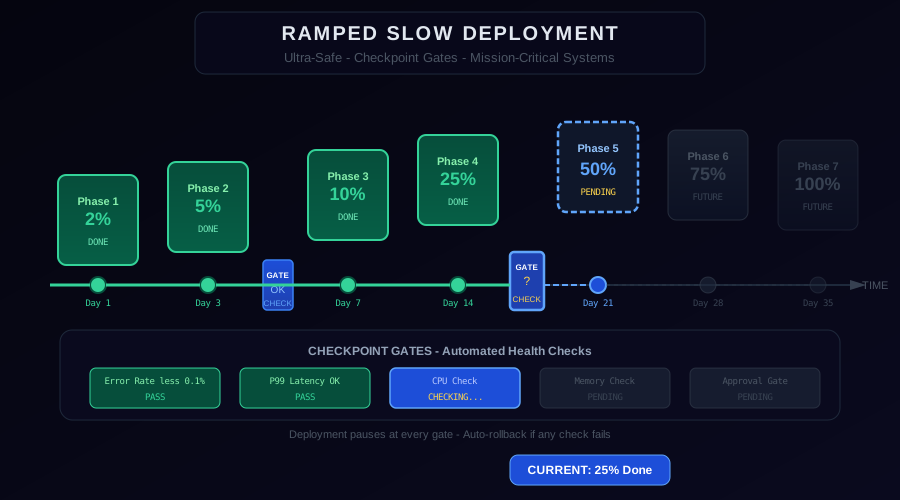
Building a reusable gate check framework prevents gate definitions from drifting across deployments and teams.
from dataclasses import dataclass
from typing import Callable, List, Optional
@dataclass
class GateCheck:
name: str
check: Callable[[], bool]
blocking: bool = True # non-blocking checks are advisory only
retry_count: int = 3
retry_delay_seconds: int = 60
@dataclass
class DeploymentStage:
name: str
traffic_percent: int
soak_hours: int
gate_checks: List[GateCheck]
requires_human_approval: bool = False
deployment_window: Optional[str] = None # e.g. "Mon-Thu 09:00-17:00 UTC"
def run_gate_checks(stage: DeploymentStage) -> bool:
failures = []
for gate in stage.gate_checks:
passed = False
for attempt in range(gate.retry_count):
if gate.check():
passed = True
break
print(f"Gate '{gate.name}' attempt {attempt+1} failed. Retrying...")
time.sleep(gate.retry_delay_seconds)
if not passed and gate.blocking:
failures.append(gate.name)
print(f"BLOCKING gate failed: {gate.name}")
return len(failures) == 0
This framework lets you define a standard set of gate checks for each service tier and reuse them across all deployments.
Defining Tier-Based Deployment Profiles
Not every service needs the same ramped slow profile. Define deployment tiers based on business impact.
Tier 1 - Core Revenue Systems (payments, checkout, authentication): Full seven-stage ramp (2%, 5%, 10%, 25%, 50%, 75%, 100%), 72-hour maximum soak at 50%, CAB required, executive notification at Full GA.
The sibling mission-critical guide intentionally uses a different six-stage ultra-safe policy (2%, 5%, 10%, 25%, 50%, 100%). These are separate illustrative policies.
Tier 2 — Supporting Systems (recommendations, search, notifications): Four-stage ramp, 24-hour soak at 25%, engineering lead approval only.
Tier 3 — Internal Tools (admin panels, reporting dashboards): Standard rolling update, no manual gates.
# tier-profiles.yaml
tiers:
tier1:
stages: [2, 5, 10, 25, 50, 75, 100]
soak_hours: [24, 24, 48, 48, 72, 24, 0]
manual_gates: [false, true, true, true, false, false, false]
deployment_windows: ["24x7", "Mon-Thu 09-17 UTC", "Mon-Thu 09-17 UTC",
"Mon-Thu 09-17 UTC", "24x7", "24x7", "24x7"]
tier2:
stages: [5, 25, 100]
soak_hours: [4, 24, 0]
manual_gates: [false, true, false]
tier3:
stages: [100]
soak_hours: [0]
manual_gates: [false]
The Rollback Runbook
Every slow deployment must have a tested rollback runbook. The runbook is not optional documentation — it is a gate check item. No deployment advances to Limited GA without a verified rollback procedure.
A minimal rollback runbook for a Kubernetes-based service:
Illustrative example, not a real deployment.
# Rollback Runbook: banking-core v3.4.2
## Trigger Conditions
- Error rate > 1% sustained for 15 minutes
- P99 latency > 500ms sustained for 10 minutes
- Any payment processing error
- On-call engineer judgment
## Rollback Steps
### Automated (preferred)
kubectl argo rollouts abort banking-core -n production
# Expected completion time: 5 minutes
### Manual fallback
kubectl patch virtualservice banking-core -n production \
--type=json \
-p='[{"op":"replace","path":"/spec/http/0/route/0/weight","value":100},
{"op":"replace","path":"/spec/http/0/route/1/weight","value":0}]'
## Validation After Rollback
1. Confirm error rate returns to baseline (< 0.1%)
2. Confirm all payment processing succeeds
3. Update change record CHG0012345 with rollback timestamp
4. Page engineering lead
## Contacts
- On-call: Check PagerDuty schedule
- Service owner: payments-team@example.com
- Escalation: VP Engineering
Deployment Communication Templates
For enterprise deployments, structured communication reduces coordination overhead and sets expectations across teams.
Pre-deployment notice (sent 48 hours before first stage):
Illustrative example, not a real deployment.
Subject: [PLANNED] banking-core v3.4.2 Ramped Deployment — CHG0012345
Starting: 2026-11-12 09:00 UTC
Estimated completion: 2026-11-26 (14-day ramp)
Change record: CHG0012345
Impact: None expected — ramped slow deployment
Stage schedule (Tier 1 sequence: 2%, 5%, 10%, 25%, 50%, 75%, 100%):
- Nov 12: 2% (24h soak)
- Nov 13: 5% (24h soak, manual gate)
- Nov 14-15: 10% (48h soak)
- Nov 16: 25% — requires CAB approval
...
Rollback: Automated + manual runbook RB-banking-core-v342
Monitoring: [monitoring dashboard URL]
Post-Deployment Review
After every Tier 1 ramped slow deployment, conduct a post-deployment review. The review captures institutional knowledge and improves future deployments.
Document:
- Actual vs planned stage durations
- Any anomalies observed and how they were resolved
- Gate checks that produced false positives or false negatives
- Suggestions for threshold adjustments
- Total deployment duration and time-to-100%
This review feeds back into your tier profiles and gate check framework, making each subsequent deployment more calibrated.
Conclusion
Enterprise ramped slow deployments succeed when they combine technical automation with organizational process. Automated gate checks prevent human fatigue from causing accidents. Change management integration provides the audit trail that compliance and security teams require. Tier-based profiles prevent over-engineering low-risk deployments while ensuring the highest-risk systems receive the scrutiny they deserve. With these patterns in place, a two-week deployment becomes not a burden but a proof of professionalism.
Related: Ramped Slow Deployment Basics | Canary Deployment Monitoring and Rollback
From the team at Nife
Deploy your next app in minutes, not days.
Nife is a multi-cloud edge platform that lets you deploy, scale, and manage applications globally without the infrastructure headache.