Blue-Green Deployment on Kubernetes with CI/CD (Guide)
Set up blue-green deployment on Kubernetes with Services, Deployments and GitHub Actions. Includes YAML, a CI/CD pipeline, cutover and rollback steps.

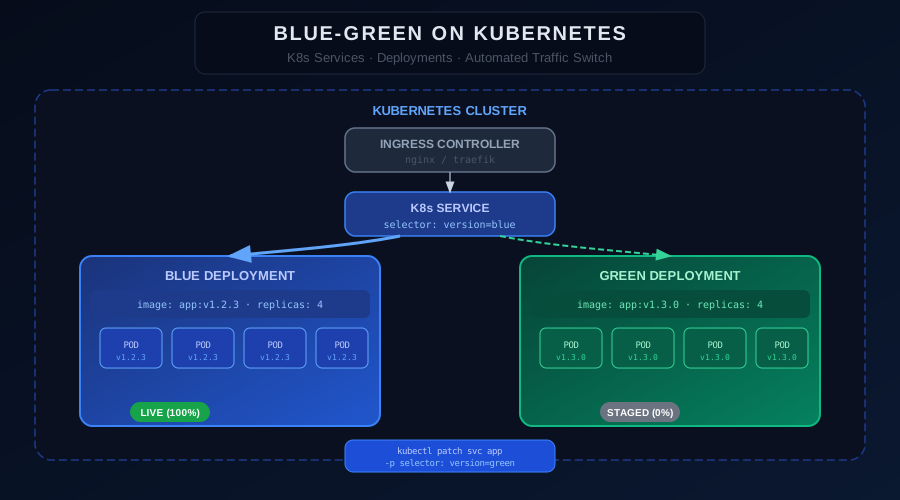
Kubernetes has become the de facto standard for container orchestration, and it offers a natural foundation for implementing blue-green deployments. The combination of Kubernetes Services, Deployments, and label selectors makes it straightforward to route traffic between two versions of your application without any downtime. If you are new to containers, start with the guide on how to deploy applications on Kubernetes before coming back here.
How Blue-Green Works on Kubernetes
Kubernetes makes blue-green deployment elegant because of how its Service object works. A Kubernetes Service routes traffic to pods based on label selectors. If you have two Deployments — one labeled version: blue and one labeled version: green — you can switch all traffic between them by simply updating the Service's selector.
# Service - the traffic router
apiVersion: v1
kind: Service
metadata:
name: my-app
spec:
selector:
app: my-app
version: blue # change this to 'green' to switch traffic
ports:
- port: 80
targetPort: 8080
When you change version: blue to version: green, Kubernetes immediately starts routing traffic to the green pods. The switch takes effect in milliseconds.
Setting Up the Blue Deployment
# blue-deployment.yaml
apiVersion: apps/v1
kind: Deployment
metadata:
name: my-app-blue
labels:
app: my-app
version: blue
spec:
replicas: 4
selector:
matchLabels:
app: my-app
version: blue
template:
metadata:
labels:
app: my-app
version: blue
spec:
containers:
- name: my-app
image: my-registry/my-app:v1.2.3
ports:
- containerPort: 8080
readinessProbe:
httpGet:
path: /health
port: 8080
initialDelaySeconds: 10
periodSeconds: 5
Apply and verify:
kubectl apply -f blue-deployment.yaml
kubectl rollout status deployment/my-app-blue
Deploying the Green Version
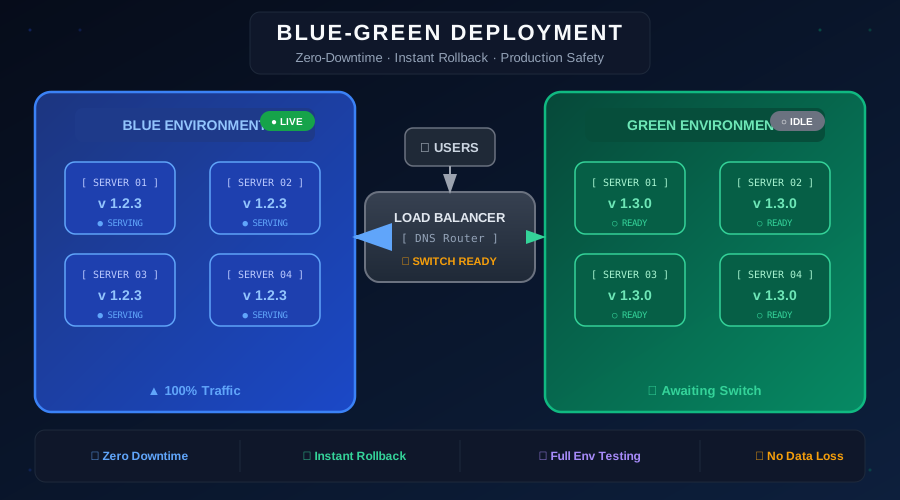
When ready to release a new version, create the green Deployment alongside blue.
# green-deployment.yaml
apiVersion: apps/v1
kind: Deployment
metadata:
name: my-app-green
spec:
replicas: 4
selector:
matchLabels:
app: my-app
version: green
template:
metadata:
labels:
app: my-app
version: green
spec:
containers:
- name: my-app
image: my-registry/my-app:v1.3.0
readinessProbe:
httpGet:
path: /health
port: 8080
initialDelaySeconds: 10
periodSeconds: 5
Running Pre-Switch Tests
Before switching traffic, run smoke tests directly against the green pods.
# Port-forward to test green without exposing it publicly
kubectl port-forward deployment/my-app-green 8081:8080 &
pytest tests/smoke/ --base-url http://localhost:8081
kill %1
The Traffic Switch
Once all tests pass, switch the Service selector from blue to green.
# Switch traffic to green
kubectl patch service my-app \
-p '{"spec":{"selector":{"version":"green"}}}'
# Verify
kubectl get service my-app -o jsonpath='{.spec.selector}'
Rolling Back
If you detect issues, roll back instantly by switching the selector back to blue.
kubectl patch service my-app \
-p '{"spec":{"selector":{"version":"blue"}}}'
Because the blue Deployment is still running with all its pods, rollback is instantaneous — no redeployment required.
Automating with GitHub Actions
A solid CI/CD pipeline automates the entire blue-green workflow from image build through traffic switch. Here is a full GitHub Actions example:
# .github/workflows/blue-green-deploy.yml
name: Blue-Green Deploy
on:
push:
branches: [main]
jobs:
deploy:
runs-on: ubuntu-latest
steps:
- uses: actions/checkout@v4
- name: Determine active slot
id: slot
run: |
ACTIVE=$(kubectl get service my-app \
-o jsonpath='{.spec.selector.version}')
if [ "$ACTIVE" = "blue" ]; then
echo "target=green" >> $GITHUB_OUTPUT
echo "active=blue" >> $GITHUB_OUTPUT
else
echo "target=blue" >> $GITHUB_OUTPUT
echo "active=green" >> $GITHUB_OUTPUT
fi
- name: Build and push image
run: |
docker build -t my-registry/my-app:${{ github.sha }} .
docker push my-registry/my-app:${{ github.sha }}
- name: Deploy to target slot
run: |
TARGET=${{ steps.slot.outputs.target }}
kubectl set image deployment/my-app-$TARGET \
my-app=my-registry/my-app:${{ github.sha }}
kubectl rollout status deployment/my-app-$TARGET
- name: Run smoke tests
run: |
TARGET=${{ steps.slot.outputs.target }}
kubectl port-forward deployment/my-app-$TARGET 8081:8080 &
sleep 5
pytest tests/smoke/ --base-url http://localhost:8081
kill %1
- name: Switch traffic
run: |
TARGET=${{ steps.slot.outputs.target }}
kubectl patch service my-app \
-p "{\"spec\":{\"selector\":{\"version\":\"$TARGET\"}}}"
- name: Rollback on failure
if: failure()
run: |
ACTIVE=${{ steps.slot.outputs.active }}
kubectl patch service my-app \
-p "{\"spec\":{\"selector\":{\"version\":\"$ACTIVE\"}}}"
Using Helm for Blue-Green
Helm charts simplify blue-green management by templating the version label.
# Deploy green version with Helm
helm upgrade --install my-app-green ./chart \
--set version=green \
--set image.tag=v1.3.0 \
--namespace production
# Switch traffic
kubectl patch service my-app \
-p '{"spec":{"selector":{"version":"green"}}}'
Integration with Istio Service Mesh
With Istio, you get fine-grained traffic control using VirtualService weight routing.
apiVersion: networking.istio.io/v1alpha3
kind: VirtualService
metadata:
name: my-app
spec:
hosts:
- my-app
http:
- route:
- destination:
host: my-app-green
weight: 100
- destination:
host: my-app-blue
weight: 0
Changing the weights from 100/0 to 0/100 performs the traffic switch. This approach also enables gradual canary-style rollouts by setting intermediate weights.
Best Practices for Kubernetes Blue-Green
- Always define readiness probes to ensure pods are truly ready before traffic reaches them
- Use PodDisruptionBudgets to prevent accidental downtime during node maintenance
- Keep both Deployments at full replica count so rollback is always at full capacity
- Tag images with git commit SHA for full traceability between deployments
- Use namespace resource quotas to prevent one Deployment from starving the other
Simplify with Nife
Nife supports blue-green deployment as a deployment strategy.
Conclusion
Kubernetes makes blue-green deployment significantly cleaner than traditional VM-based approaches. The Service selector pattern provides a simple, reliable primitive for instant traffic switching. Combined with the GitHub Actions workflow above, your entire release process — from code commit to production switch — can be fully automated with built-in rollback on failure.
Explore next: Canary Deployment Guide | Shadow Deployments on Kubernetes
From the team at Nife
Deploy your next app in minutes, not days.
Nife is a multi-cloud edge platform that lets you deploy, scale, and manage applications globally without the infrastructure headache.