Rolling Update vs Ramped Deployment: Key Differences
Rolling update vs ramped deployment compared on speed, rollback, infrastructure cost and risk, with Kubernetes and CI/CD examples to help you pick one.

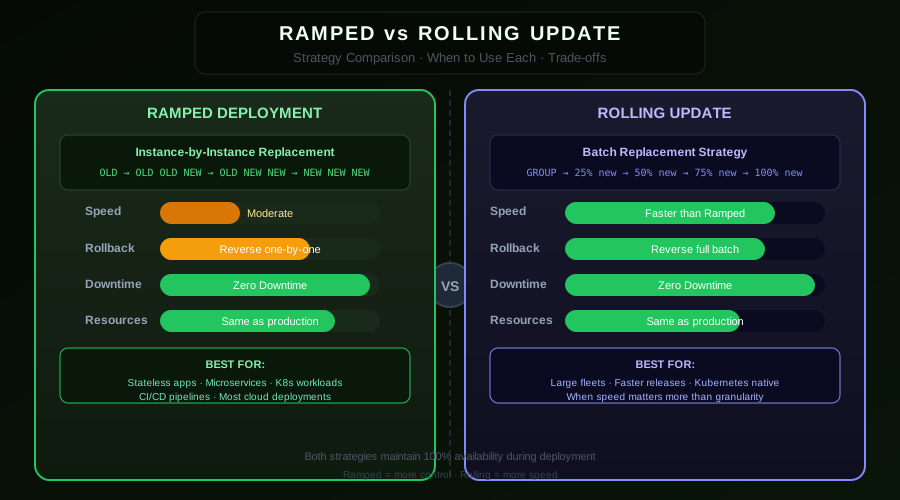
The terms "rolling update" and "ramped deployment" are often used interchangeably, and for good reason — they describe the same core concept: replacing old instances with new ones progressively. But there are meaningful differences in how they are configured, controlled, and monitored depending on your platform and requirements. For a broader context, the full range of types of deployment strategies spans from simple recreate deployments to blue-green and canary approaches.
Defining the Terms
Rolling Update refers specifically to Kubernetes' built-in RollingUpdate deployment strategy. It is a platform-level feature with well-defined parameters (maxUnavailable, maxSurge) that Kubernetes manages automatically.
Ramped Deployment is the broader architectural pattern of gradually replacing instances. This can be implemented through Kubernetes rolling updates, manual instance replacement, weighted load balancers, or custom tooling.
In practice, when people talk about "ramped deployment" in a Kubernetes context, they almost always mean a configured rolling update with explicit staging and monitoring. The ramped deployment adds operational guardrails — staged checkpoints, metric thresholds, and controlled pause/resume — on top of the platform primitive.
Key Differences
| Dimension | Kubernetes Rolling Update | Ramped Deployment |
|---|---|---|
| Control | Automatic, platform-managed | Manual or tool-driven checkpoints |
| Stages | Continuous progression | Explicit percentage gates |
| Monitoring | Optional | Required at each stage |
| Speed | Configured by maxUnavailable/maxSurge | Controlled by stage duration |
| Rollback | Manual (kubectl rollout undo) |
Automatic on threshold breach |
| Use case | Standard applications | High-stakes or customer-facing |
When a Plain Rolling Update Is Enough
A plain kubectl rollout with well-configured probes is sufficient for:
- Internal services — backend workers, data pipelines, internal APIs where brief version mixing is acceptable
- Stateless services — applications with no session state or database schema changes
- Frequent deployments — teams deploying multiple times per day who need low ceremony
- Low business risk — services where a brief degradation is tolerable
strategy:
type: RollingUpdate
rollingUpdate:
maxUnavailable: 1
maxSurge: 1
The kubectl rollout status command gives you a live view of progress. If anything goes wrong, kubectl rollout undo reverts in seconds.
When You Need the Ramped Pattern
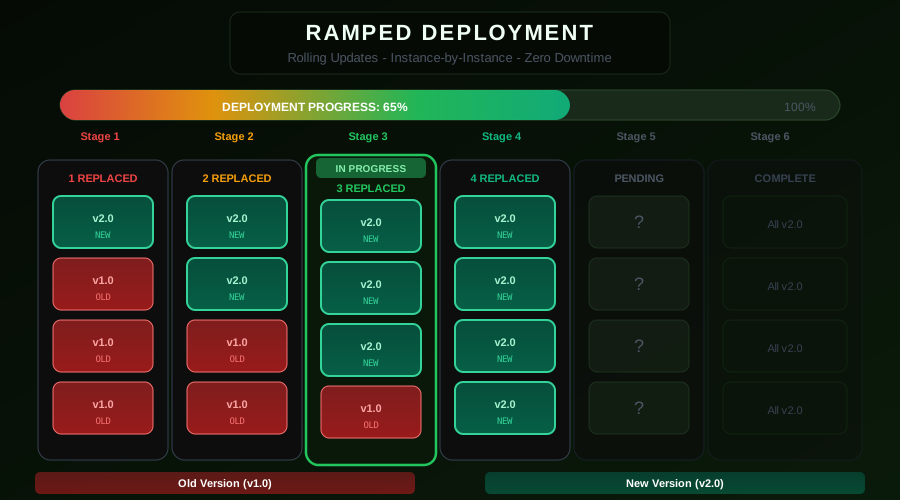
The ramped deployment pattern — with explicit stages, metric validation, and automated rollback — is appropriate for:
Customer-facing features — Any deployment that changes user-visible behavior should be staged with explicit metric validation between stages.
Database schema changes — When a migration must land before the new code serves production traffic, you need explicit checkpoint control rather than continuous automatic progression.
Services with SLAs — When you have contractual uptime commitments, automatic rollback on metric degradation is essential.
Large fleets — Deploying to hundreds of instances benefits from staged gates: validate at 10%, 25%, 50% before committing to 100%.
Implementing Staged Ramped Deployment
The key addition in a ramped deployment over a plain rolling update is the pause-validate-resume pattern.
#!/bin/bash
DEPLOYMENT="my-api"
NAMESPACE="production"
IMAGE="my-registry/my-api:v2.0.0"
STAGES=(10 25 50 75 100)
kubectl set image deployment/$DEPLOYMENT \
my-api=$IMAGE -n $NAMESPACE
for STAGE in "${STAGES[@]}"; do
# Scale to target percentage
TOTAL=$(kubectl get deployment $DEPLOYMENT -n $NAMESPACE \
-o jsonpath='{.spec.replicas}')
TARGET=$((TOTAL * STAGE / 100))
echo "Stage: $STAGE% — waiting for $TARGET new pods..."
# Wait until target percentage of pods are updated
while true; do
UPDATED=$(kubectl get deployment $DEPLOYMENT -n $NAMESPACE \
-o jsonpath='{.status.updatedReplicas}')
[ "${UPDATED:-0}" -ge "$TARGET" ] && break
sleep 10
done
# Validate error rate
ERROR_RATE=$(kubectl exec -n monitoring deploy/prometheus -- \
promtool query instant http://localhost:9090 \
"sum(rate(http_requests_total{job=\"$DEPLOYMENT\",status=~\"5..\"}[5m])) / sum(rate(http_requests_total{job=\"$DEPLOYMENT\"}[5m]))" \
| grep -oP '\d+\.\d+')
if (( $(echo "$ERROR_RATE > 0.02" | bc -l) )); then
echo "Error rate $ERROR_RATE exceeds 2% at stage $STAGE%. Rolling back."
kubectl rollout undo deployment/$DEPLOYMENT -n $NAMESPACE
exit 1
fi
echo "Stage $STAGE% healthy. Error rate: $ERROR_RATE"
done
echo "Ramped deployment complete."
Rollback Speed Comparison
This is the most important practical difference between the two patterns.
Rolling update rollback — kubectl rollout undo triggers another rolling update in reverse. If you had 10 pods updated, Kubernetes starts replacing them back one batch at a time. This can take several minutes depending on maxUnavailable and pod startup time.
Blue-green rollback — Instantaneous. Update one label selector.
Ramped deployment rollback — Can be faster than a plain rolling update if you paused at an early stage (e.g., 25%), since fewer pods need to be replaced. If you progressed to 100%, rollback speed is the same as a rolling update.
Cost Comparison
| Strategy | Infrastructure Overhead |
|---|---|
| Rolling Update | None — only desired replica count runs |
| Ramped Deployment | None for staged rolling; +100% if using parallel environments |
| Blue-Green | +100% during transition period |
| Canary | Small (~5–10% extra replicas) |
Rolling update and ramped deployment are the most cost-efficient strategies because they never run more than the desired replica count (at the cost of brief capacity reduction during the rollout).
Choosing maxUnavailable and maxSurge for Ramped Deployments
The right values depend on your availability requirements and rollout speed goals.
For mission-critical, high-traffic services:
rollingUpdate:
maxUnavailable: 0
maxSurge: 1
Never reduce capacity. Add one new pod, wait for readiness, then remove one old pod. Slowest but safest.
For standard services with moderate traffic:
rollingUpdate:
maxUnavailable: 25%
maxSurge: 25%
Kubernetes supports percentage values. With 20 replicas, this means up to 5 unavailable and 5 extra at any time. Good balance of speed and safety.
For fast deployments where brief degradation is acceptable:
rollingUpdate:
maxUnavailable: 50%
maxSurge: 0
Half the fleet is replaced at once. Aggressive, but completes in roughly half the time.
Integrating with GitOps
For teams using ArgoCD or Flux, ramped deployments fit naturally into the GitOps model. Update the image tag in your Helm values or Kustomize overlay, commit to your config repo, and ArgoCD syncs the change. For a deep dive on chart structure and upgrades, see the guide on Kubernetes deployments with Helm.
# argocd-rollout.yaml — with progressive delivery
apiVersion: argoproj.io/v1alpha1
kind: Rollout
spec:
strategy:
canary:
steps:
- setWeight: 25
- pause: {duration: 10m}
- setWeight: 50
- pause: {duration: 10m}
- setWeight: 100
analysis:
templates:
- templateName: error-rate
startingStep: 1
Argo Rollouts extends Kubernetes Deployments with native support for staged rollouts, automated metric analysis, and GitOps-friendly configuration.
Conclusion
For most applications, Kubernetes' built-in rolling update with well-configured probes and maxUnavailable: 1, maxSurge: 1 is the right starting point. Add explicit staging and metric validation when you are deploying to high-traffic, customer-facing services where even a 2% error rate during a rollout is unacceptable. The ramped deployment pattern is the rolling update with professional guardrails.
Related: Ramped Deployment Basics | Ramped Slow Deployment for Ultra-Safe Rollouts
From the team at Nife
Deploy your next app in minutes, not days.
Nife is a multi-cloud edge platform that lets you deploy, scale, and manage applications globally without the infrastructure headache.